Showing posts with label Tech. Show all posts

Friday, May 18, 2018

Legacy's ObitMessenger email alerts aren't completely reliable

Below on the left you see an obituary that appeared in the August 11, 2017 St. Louis Post Dispatch.

Legacy has an ObitMessenger service that is supposed to send you alerts if certain keywords show up in a specified newspaper's obituaries. You can specify up to five keywords per alert, and you can set up multiple alerts. Perfect for keeping track of obituaries with surnames of interest.

On the right is an email I received on August 12th, 2017 stating that no obituaries had appeared in the past 14 days with the specified words. (The alert is localized to the St. Louis Post Dispatch.) I have deleted the surnames from the email image that aren't applicable. I've also deleted my email address.


I don't know why the obituary wasn't found.
A search today on the website returns the obituary.
I may have to stop relying on the email service.

Friday, June 2, 2017

Tech Tip: Making your Blog/Website more Accessible

How accessible is your blog/website? Is the color/size/font of your text readable to everyone?
Can someone click a button and have the text read to them?

Sure, those with difficulties often have apps of their own to do this for any website, but maybe they’re away from their computer and at a library computer that doesn’t have them.

ATBar (Assistive Technologies) provides a free app, easy to install, that creates a toolbar increasing the accessibility of your blog or website. Download and install instructions can be found on the AtBar website.

You can insert the code anywhere on your blog/website. I have placed it in my left-column. Once you click the ATbar button, a toolbar similar to the one pictured below should appear on your screen.

“ATbar has been created as an open-source, cross-browser toolbar to help users customise the way they view and interact with web pages. The concept behind ATbar is simple: One toolbar to provide all of the functionality you would usually achieve through the use of different settings or products.” 
“It is designed for those who may not have their assistive technologies to hand and need a quick way of accessing text on the screen with magnification and/or text to speech etc. It can help those with low vision, dyslexia and other reading difficulties, as well as those who may wish to just reduce the glare of black text on bright white backgrounds. It is not designed for regular screen reader users who need their assistive technology to access the computer as well as their browser.”
Added functions include:
1) Increase
2) Decrease font size
3) Change font typeface/line spacing
4) Spellcheck
5) Dictionary
6) Text to Speech
7) Word Prediction
8) Change text, link, and background colors
9) Create an overlay color for the site

Monday, November 21, 2016

Ancestry We're Related Sofware Glitch

Saturday I checked my Ancestry We’re Related app and was told I had 0 celebrity matches.

Here’s the chart of 40 celebrity matches I had on Friday.

I spent four years as a programmer in a corporate IT department and understand software glitches happen. I sent some feedback. Was told they were hopeful to have a fix this week. I’m cool with it. It's not like I'm paying anything for the mobile app, and I consider it mostly entertainment. Though I am researching the shared ancestries to see if I can add on to my ahnentafel.

Later Saturday I received an initial 5 celebrities which are up to 7 this morning. If the fix doesn’t restore the former matches as a bunch, but instead at the former rate of approximately one match a day, it will be interesting to see if new matches are added in with the old, as one might expect if the process is random, or whether there is some method to the order in which the matches are announced. Currently, all 7 were part of my original 40. (Though they are not a 1-1 match of my original 7)

I have also noticed the relationships aren’t exactly the same for all matches.
It is conceivable that the changes and the software glitch may be connected.

Current matches, relationships, and alleged shared ancestor:
• Bill Gates – 9th cousin 1x removed – Hannah Gore (*)
• Meghan Trainor – 9th cousin 2x removed – John Lathrop
• Lady Gaga – 10th cousin – Sarah Purrier (**)
• Britney Spears – 9th cousin 2x removed – John Smith
• Marilyn Monroe – 9th cousin – Ruth Wheldon (***)
• Johnny Depp – 9th cousin 2x removed – Capt. Richard Betts
• Matt Damon – 9th cousin 1x removed – James Clark

* Bill Gates was listed as my 9th cousin 2x removed with Susannah Hinckley as my shared ancestor. A closer relationship appears to have been found.
** Lady Gaga was listed as my 10th cousin with Thomas Mapes as our shared ancestor. I think the relationship is the same, except they have now decided to provide Thomas Mapes’ wife as the shared ancestor.
*** Marilyn Monroe was listed as my 9th cousin 1x removed with the shared ancestor of Thomas Burgess. Here too, a closer relationship appears to have been found.

Tuesday, November 15, 2016

Embedding Google Drive Documents into your Blog or Website

 Do you have a document in Google Drive (such as a spreadsheet) you would like to embed into your blog or website?

By doing so, whenever you updated the document in Google Drive, it would automatically update on your blog/website.

Within the document, go to the File menu
Select "Publish to the web..."
  • Select "Embed"
  • If it's a spreadsheet, you'll have the option of choosing between "Entire Document" or an individual "Sheet."
  • Then click "Publish" 

You will be shown some html to copy/paste into your webpage or blog post

Examples:
  • I have transferred the ahnentafel I created back in 2010 to a spreadsheet and created a new page accessible at the top of the blog.
  • I have also created a page for Notable Kin which currently consists of the table I began a week ago containing the alleged celebrities Ancestry's new mobile app has suggested.


Friday, August 12, 2016

Augmented and Virtual Genealogy?

James Tanner at Genealogy's Star has been discussing the future of genealogy in a series of posts on The Dawn of the Genealogical Information Age.

Science Fiction author David Brin asks the question: How will augmented reality change us?
Augmented reality (AR) is a live direct or indirect view of a physical, real-world environment whose elements are augmented (or supplemented) by computer-generated sensory input such as sound, video, graphics or GPS data. [source]
Brin's focus is on whether AR spells doom or excitement. I have a preference for being optimistic. The two of them got me thinking, with the increasing amount of data available, and increasing technological advances, how will this impact the future of genealogy? In particular, augmented reality and virtual reality.
  • Instead of just QR barcodes popping up additional information on your phones, might future trips to cemeteries involve images of the deceased telling visitors about their lives. 
  • Augmented or Virtual librarians? I doubt a computer program can provide the personalized  help a living librarian can, but when all the staff are helping other patrons, an AR/VR librarian might be available to provide some assistance.
  • Will there come a day when the average person can do their own programming as easily as we can create webpages today, and generate simulations of their ancestors? Imagine the possibilities for family reunions.
  • Can you imagine a virtual cemetery version of FindAGrave? Will people be able to visualize walking through the actual cemetery? When they find their ancestor’s plot, perhaps they will be able to lay a virtual flower, or place a virtual stone, on the grave. Perhaps the program will have a link to relative graves – at other cemeteries to ‘walk.’ It won’t matter if the writing on the actual tombstone has long since been worn away if the image of it is in the database.
  • Will you be able to provide a computer program with a photo of your ancestor and military records, and they’ll insert the face of your ancestor into a battle they actually fought in. Many family historians would like to be able to visualize how their ancestors lived, and we might be close to being able to provide that experience.
  • Lots of genealogists are worried about the disappearance of microfilm, saying if you don’t know exactly where it is with indices, it’s much easier to find a record in microfilm than it is online. What about a virtual microfilm reader? If microfilm readers really do provide an easier browsing mechanism, why not recreate that mechanism virtually. 

Saturday, January 17, 2015

MyHeritage Family Tree Builder - Date and Language functions

MyHeritage announced they had a free Mac version of their Family Tree Builder database software, so I decided to download it and give it a try. Not only because it was free, but I was hopeful it would handle something better than my current program. Hebrew calendar dates. I had good reason to be hopeful, MyHeritage is headquartered in Israel. I wasn't disappointed.

MyHeritage allows you to enter all dates in one of three calendars - Standard (Gregorian), Hebrew, and French Revolutionary Calendar. (The last surprised me at first. However, MyHeritage may have a sizable French user base, as the software appears to be written to appeal to an international audience.) It also provides easy conversion between these systems. I am somewhat disappointed that they haven't added the Julian calendar to this component, but perhaps they will at some point.

After I imported my database, this is what my second great grandmother's entry looked like at first:


I clicked on Edit in the lower right.

[Note: I know her death place, cause of death, and burial location. This information is in the Notes section. I haven't always entered it into the separate fields.]


 I clicked on the calendar icon next to the deceased date on the right side.


I clicked the convert button.  (The very first time I had to use the pull down menu to select "Standard to Hebrew." After that it defaults to the last used option.)


After clicking OK this is how her entry looks, with the Hebrew date in brackets:


It would seem nice if there was a way to automatically convert every date in the database with one click, instead of going through and doing it individually. However, it would be wrong for the software to encourage the genealogist to do this since the conversion depends on whether each event was before or after sunset. (The Hebrew calendar date starts at sunset.)

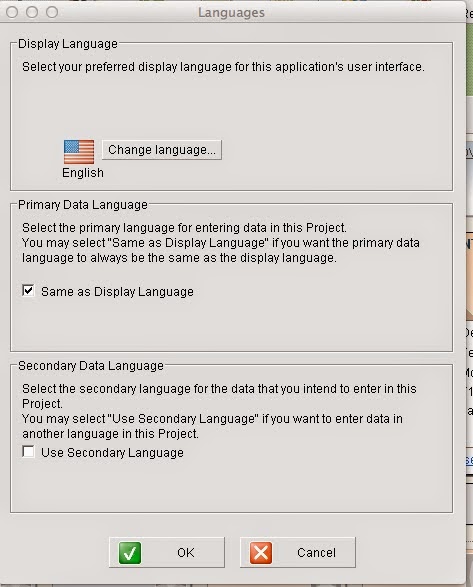
It is also possible to add a secondary language for entering data. In the "Tools" menu, select Languages.


You will see this menu:

 Select the checkbox indicating you want a secondary language, and click OK

You will be given a list of 40 languages!

I chose Hebrew, and this is now how my second great grandmother's "Edit Details" screen appears:

The order of information in the Hebrew language date is unusual.  It reads: February 1924 , 8 Adar A 5684 13. I am unsure why the Hebrew date is embedded within the Standard date in this manner.

If I click on "Names" I am given several fields, including "Religious Name," which will be useful for me, as well as both a "Maiden Name" and "Former Last Name." The latter would be useful for those who have multiple marriages.


Visually, I don't find the software's interface as appealing as my current software. However, its features could win me over. Currently I find it annoying that every time I load the software it asks me if I want to sync it with my "own family site" on MyHeritage. I don't have a family site on MyHeritage, and I don't want one right now. If anybody knows how to turn this pop-up off, let me know.

The software is free, though, so it's hard to get too upset.

Friday, June 28, 2013

Ancestry New Search and Phonetic Searches

It had been awhile since I used Ancestry's "New Search" so since "Old Search" is going to disappear soon, I started to explore a bit.

One of the first things I saw briefly got me excited. In addition to the standard Soundex, they offered a 'phonetic' search. So I thought I would try it out with the one surname of mine that has several different phonetic variations, but for which I feel Soundex is a complete failure. Soundex may have been a useful algorithm when it was invented, in 1918, but better algorithms have to be possible by now. Beyond entering the surname, I selected no other restrictions:


Here were the results:

Over three million hits for phonetic variations of Cruvant? Really? This is what I expect from Soundex. Other surnames that share the same Soundex code as Cruvant include: Carpenter and Corbin. These surnames are not close to a phonetic match to Cruvant, but Soundex thinks they are. It was clear to me that whatever algorithm Ancestry was using for 'phonetic' was no better than Soundex. I started browsing through the screens to see when the non-matching names would start.

A little bit less than 300 matches for Cruvant, and over three million other surnames, none of which are likely the variations I would hope for: Kruvant, Kroovant, Cruvand, and Kruvand. There should be no reason the first two shouldn't come up with any algorithm coded for English phonetics. The latter two would be nice, but I would understand why they got missed.

When I found Ancestry's explanation of Phonetic Variations, I understood:

"There are other name matching algorithms that we can use to help identify records to consider for your results. If you choose phonetic we will identify appropriate algorithms that apply to specific data collections and if a record has one of those names, we will use it as a possible record for your results set. For example, if you are prioritizing Jewish Collections first, we would choose the Daitch-Mokotoff phonetic algorithm."

In other words: We know of other algorithms. We aren't going to tell you what those algorithms are except for one we randomly choose for an example. There may be others. There may not be. We're not going to tell you. You can't select to use any of these algorithms instead of Soundex. If we decide an algorithm might be appropriate for a particular collection of records, we might use it. We might not. We probably won't even tell you when we do. Selecting 'Phonetic' is really the same as selecting 'Soundex' unless we decide it isn't going to be for a particular search, and we get to decide, you don't. But if selecting 'Phonetic' makes you feel good, go ahead. That's what we're here for, to convince you to click on checkboxes that 9 times out of 10 won't do anything.

Note: I did conduct a Phonetic search on a collection of Jewish records, and a search on the surname "Kruvant" turned up no results when there were "Cruvant" records. See images below.

According to this Daitch-Mokotoff converter they have matching codes. Which means Ancestry chose not to use this algorithm for that search. What a shame. The one algorithm they do mention, and a collection they imply they might use it for, and they didn't.

(Cruvant, Kruvant, Cruvand, Kruvand, and Kroovant all have the same Daitch-Mokotoff code - 597630. For my own personal research, I would love to use this algorithm with every database at Ancestry. Ancestry claims that they have the algorithm coded into their software. Why can't I use it?)


I realize this has nothing to do with the difference between Old Search and New Search, since Old Search doesn't provide you with the 'phonetic' checkbox. I suspect someone might be able to point me to a collection where the Daitch-Mokotoff algorithm is used, but that's not the point.

Genealogy and Tech: Google and Ancestry

Google Reader disappears on Monday

As they announced back in March the Google Reader app will be retired on July 1st. At the time I said I was going to try NetVibes and TheOldReader and choose the one I liked better. I chose TheOldReader very quickly. I was even very impressed when TheOldReader discovered where some old blogs had gone and moved to.

I've seen an uptick the past few days in people asking for suggestions. Not too surprising. I'm usually in the group that waits to the last minute. Many people are recommending Feedly. However, Feedly still doesn't have a version for Internet Explorer. As I said back in March, I hate IE, but I am restricted to using it for a good portion of my time. I have also heard some complaints that Feedly doesn't have a 'search' function. TheOldReader does have a search function. On the other hand, TheOldReader doesn't have a mobile app. This isn't an issue for me, as I don't like reading blog entries on my iphone. I prefer the larger screen.

Correction: TheOldReader has opened up their API and there is an iPhone/iPad mobile app that works with it. Feeddler. I will need to test it out, even though I think I will still prefer using a computer screen.

While there are other options, depending upon your OS and Browser needs, TheOldReader and Feedly seem to be the favorites.

Ancestry
For quite awhile Ancestry.com has been maintaining two separate search engines, one they called New Search, and the other Old Search. They announced yesterday that they are going to stop doing that. But unlike Coca Cola, they aren't retiring New Search. 

An email they sent out yesterday to Old Search users:
Dear John, [I suspect the name was different on different emails] 
Ancestry.com is continuing our efforts to improve the search experience across Ancestry.com and will be making changes to our search functionality in the upcoming months. Some features will be added and some will be discontinued. As part of the 2% of our subscribers that use the old search function on the site, we know that you are passionate about the search experience on Ancestry.com and we are reaching out to you to get input on potential improvements. We hope you will take the opportunity to share your insights and feedback on our plans. 
To identify which areas of the experience we should focus on this year, we have drawn on customer input, usage data, usage patterns and our old search function for inspiration. From all of that, we are looking at making your time on Ancestry.com more productive by improving these areas of the search experience in 2013:
  • More relevant search results with the best results at the top
  • Easier refining and control of your search results
  • Keeping a better history of the work you have done
  • Publishing more new content and more corrections to existing content
  • Performance improvements to return results faster
As we begin to make these improvements, we will no longer maintain two separate search systems for the site. Maintaining two systems limits the resources we can use to make improvements and increases the complexity of every improvement we try to make. Additionally, continuing to maintain the two systems limits our ability to direct more investment into other areas like adding more record collections and correcting existing collections.Based on that, as a part of the work this year we will be bringing together the two search experiences into a single search experience on Ancestry.com. We hope to bring forward the best features of both the old and new search systems into the consolidated experience to facilitate the transition for our users and to improve the overall search experience. We expect to discontinue the old search function as a separate experience within the next 6 months.As a user of the old search feature, we wanted to give you advance notice and let you influence the changes we are making in search. Please take this survey to share your feedback and ideas on key features to improve.Best regards, 
The Ancestry.com Product Team

As a former computer programmer, their explanation makes perfect sense, and I am surprised both search options lasted as long as they did.

If they do combine New Search with the best 'features' of Old Search, I think many of the 2% will be happy. I find the layout of the search results in New Search less appealing, and more difficult to navigate. There are complaints that wildcard searches more often return error messages on New Search, and when they do work, yield less complete results than Old Search.  As a former computer programmer I will state, working correctly isn't a 'feature' it's a 'requirement.' But if Old Search ceases to exist, there won't be a way for people to easily discover the results are incomplete.

Other Commentary on the Upcoming Retirement of Old Search

Wednesday, March 20, 2013

The Old Reader Works Some Serious Magic

It took a few days, but The Old Reader finally managed to handle the overload on its server from Google Reader users seeking a new home. I uploaded my Google Reader feed file on Thursday night. This morning I received an email that the import process had been completed, and all 378 of my feeds were processed. Their server speed is still a bit slow, but it's understandable. As of March 18th, their user base had grown 12-fold. They've announced that they are exploring a freemium model, but the free plan will keep its current functionality.

As I looked at the feeds, my jaw dropped in shock. I asked myself if it was Easter morning, because the dead were rising from the grave.

When one follows several hundred blogs, if blog posts from any single blog stop showing up in your inbox, you might mourn the loss of the content, but you might not actively seek out where the blogger has moved.  Even if it is as simple as visiting the website and seeing if they made a small change to their RSS feeds, you might not go to the trouble. Some people might clear out the dead feeds, but others would just let them be - you never know when the blogger might reeturn.

Without identifying the blogs in question:
  • In one case, the blog feed URL had moved from
www.domainA.com/rss/newfeed.xml to www.domainA.com/feed
  • In another case, the blog feed URL moved from
www.domainB.com/blog/atom.xml to www.domainB.com/feed

But I suppose since the blogs were still at the same top-level domain, The Old Reader found it.

In both cases, Google Reader stopped displaying the posts over a year ago.
When I imported the feeds to NetVibes, NetVibes reported them as 404s.

Thursday, March 14, 2013

Google Reader Alternatives: First Glance

I've begun looking at various alternate RSS Feed Readers recommended by various Tech sites, such as Macgasm, LifeHacker, and CNET.

Feedly: Has different apps for iOS, Android, Safari, Chrome, and Firefox. No version for Internet Explorer. I don't like Internet Explorer, but I am restricted to using it at work. I wouldn’t be able to catch up on blog posts during my lunch hour. (Well…sure I could…on my phone. But it’s easier to read blog posts on a large screen.)

NewsBlur: When I first looked at NewsBlur the evening of March 13th, it said that its free version had a limit of 64 feeds. By March 14th, that number had decreased to 12. The decrease could be temporary, there is no information on their blog. Regardless, that's too low for me. Their premium version is only $12/year.  If there were no other viable choices, I’d consider it. But with worthwhile free options, paying even $12/year is too much.

TheOldReader: Created when Google Reader made some changes that upset some users, it was constructed to look and feel exactly like Google Reader. Currently, due to server overload, they are limiting the number of users who can import their feeds at one time, so I haven’t had a chance to really test this out, but it looks promising. Especially for users who don’t like getting used to new things. Update: Was able to upload my subscription file the evening of March 14th, but received a message that it could be several hours before the subscriptions were imported, as 5482 users were in the import queue ahead of me.

Google Currents: Only has iOS and Android versions. If you only follow your subscriptions on a phone or tablet, this might be a good alternative. Until Google decides it no longer wishes to maintain it either.

NetVibes: The only place so far I have been able to import my Google Reader feeds. Their interface is more complicated than Google Reader. They have two views: Reader and Widget. Reader is similar to Google Reader, though I haven't figured out the best way to bookmark articles to return to them. Widget view allows you to add additional functionality similar to an iGoogle page. (iGoogle is being retired in November of 2013)

Pulse: This seems to be one of the more popular 'visual' readers. For those who like to view their blogs in a newspaper/magazine style. It is my opinion the more blogs one subscribes to, the less useful this becomes. It was announced yesterday that LinkedIn is close to buying Pulse. Not sure how that will impact the application (or the networking site).

Currently, my plan is to test out NetVibes and TheOldReader and decide which one I prefer. If someone suggests I try something not listed above, I'll consider it.

Another factor some might be wondering about is how likely are the above websites to be around a year from now? I have no ability to measure that for any of the options above. Especially not Google Currents. Google Reader has been in existence since 2005, but Google has been doing a lot of 'spring cleaning' recently, and making it clear they are willing to abandon applications they view as unsuccessful. (And many people would not have included Google Reader in that list.)

Wednesday, March 13, 2013

Survey Update: Possible Bad News for 70% of My Readers

Five days ago I posted a simple survey, asking my readers how they followed the posts on my blog.


70% of the current votes are going towards using an RSS reader, such as Google Reader.

While there are multiple RSS readers, Google Reader is one of the more popular ones.
According to Google Reader's statistics, over 100 people are subscribers to this blog.

As popular as it is, today Google announced it is retiring it.
As of July 1st, 2013, Google Reader will no longer exist.

I am a user of Google Reader myself, and would appreciate suggestions on other Readers to try.

Lifehacker provides some suggestions

Thursday, February 14, 2013

CAPTCHA Cha-Cha

CAPTCHA is an ancronym for Completely Automated Public Turing test to tell Computers and Humans Apart

A Turing Test - named after Alan Turing - is a test of a machine's ability to simulate a human. A test to tell computers and humans apart.

[Obviously, the CHA part of the acronym is redundant and repetitive. Apparently those who coined the term wanted to add half of a dance step to it.]

Some people refer to a CAPTCHA as a "Reverse Turing test," since it is a computer program providing a test to a human (or another computer program). You're probably very familiar with CAPTCHAs. And you probably hate them.


Above is the CAPTCHA form you will find on blogs using the Blogger software. Often they are a lot more difficult to read than the sample above. I have been blogging since 2002, and up until November of 2012 I avoided installing a CAPTCHA. Here's a 2005 post on my non-genealogy blog explaining my anathema. (At that time I used a blogging system called MovableType. A week later I switched to Blogger. In February of 2006 I switched to WordPress. When I created this separate genealogy blog, though, I chose Blogger. MovableType still exists, maybe someday I will experiment with it again. Or try something else.)

Where was I? In November of 2012, on this blog, I was getting enough spam in my moderation queue on a daily basis I felt it was taking too much time to delete it all. I discovered Blogger's CAPTCHA had an audio option for the visually impaired, overcoming one of my major complaints about CAPTCHA in 2005. So I added the CAPTCHA, and that solved the problem instantly. For me. I'm sure it created problems for some of my readers. Most of you were kind enough not to say anything. (I do have an email address posted, even if you found yourself unable to leave comments.) However, I have received some comments recently almost begging me to remove the CAPTCHA.

I decided to test removing it, and see how much spam I received. November might have been a temporary fluke. For a few days the CAPTCHA hasn't been there. I have been getting some spam, but not nearly as much as I was getting in November. I can handle it at this level.

Some other bloggers recommended to me that I remove the "Anonymous" option in my comments. It is true that all the spam I receive in my moderation queue was/is anonymous (Back in November, and Today). However, I feel the Anonymous option is essential, at least for me.

Here is what the "Choose an Identity" portion of my blog's comment screen appears like currently:
For someone who doesn't own a Google Account, and has no clue what OpenID even means, much less how to use it, the only two choices are Name/URL and Anonymous.  If I could, I would remove just the Anonymous option. But on Blogger, removing "Anonymous" also removes "Name/URL."

Leaving:
There are many many many internet users who would look at that, scratch their head in consternation, and probably curse a little. CAPTCHAs might be irritating, but in my estimation this would result in greater confusion and annoyance. I want to scare away as few distant cousins as possible.

So What Happens if Your Spam Increases Again?
Will the CAPTCHA return?
Maybe not.

I've been investigating several other options.

1) Leave Blogger

WordPress allows for a lot greater flexibility in Spam Control. Their Akismet plug-in is exceptionally good at catching spam. I'm surprised Blogger isn't as good, as Google's Gmail is also exceptional. If the Akismet plug-in started to fail, there are some plug-ins with significantly more benign CAPTCHAs. Honeypots and Checkboxes are my current favorites.

A Honeypot Captcha inserts an invisible input box into the comment form; that is, it is invisible to humans. The spambots will see the box, and fill it in. The biggest problem with honeypots is that many people use automatic scripts on their browsers to fill in forms. Those scripts see the honeypots too.

Checkboxes, as the name suggests, inserts a simple checkbox asking if you're human. The spambots aren't (currently) expecting this. I suspect as checkbox CAPTCHAs become more common, the spambots will become smarter.

I prefer Blogger's user interface, but this is a possibility. There are other blogging systems I might investigate. My website host offers easy installation of either B2Evolution or Nucleus - neither of which I am familiar with. I'd appreciate insight from anyone who has used either of them. 

2) Install Disqus or IntenseDebate

I've heard that both of these comment systems can be installed on Blogger, and both have greater means of spam control. I would appreciate any insight from those who have used either of them, from the perspective of either blogger or commenter. I don't receive a lot of comments on my posts, so my main reason for using these would be spam control.

3) Install a completely separate comment script on my website, and link to it from my blog. There are lots of options here. I have a very simple guestbook/messageboard on another site that is completely spam-free. This would allow those who can't navigate the CAPTCHA to leave a visible comment for me.
 
Whatever I do, I will always provide some means for people to leave comments, and I will try to make it as user friendly as possible.
 
If anyone has any thoughts on this topic, please feel free to share them in the comments.

Friday, July 20, 2012

Correcting a Serious Mistake

I’ve uploaded parts of my genealogy database to a few different websites. If I am going to make the tree public, I’ve naturally always trimmed it a bit. My standard procedure is to delete every record of a living person. Most of the websites have privacy mechanisms that obscure information for living individuals, but which information they obscure sometimes varies, and technology can always fail. So no information is better, in my opinion, than obscured information. What the software doesn't know, it can't reveal to the world.

But a recent occurrence made me realize this isn’t always enough. A cousin contacted me, (rightfully) upset because some private information appeared on an entry at Wikitree. How did this happen? I had placed information about a living person within the source notes for their ancestor.

I actually do this a lot, but not to the extent in this case. I copy and paste obituary notices all the time for the individuals in my database. And those obituaries usually contain the names of children and grandchildren. However, few would complain about their name appearing in the obituary of their grandparent.

This lapse was a lot more serious. I had copied and pasted an entire email from a cousin, detailing names, and dates of birth, for several generations. I naturally pasted it into the notes for the original ancestor, and entered ‘see notes for X’ in the notes for the later generations. This email was my ‘source’ for much of the information; it made sense for me to copy and paste it into the database. I just forgot I had done this when I uploaded it to WikiTree. To cap it off, the email also contained a couple email addresses, and a postal address. (This contact information has now been deleted from my database. It didn't need to be there as part of the source material.)

At least WikiTree is a Wiki – making quick edits easy. Within minutes of getting the email, I had removed the text of the email from the profile. Of course, as is standard for the Wiki software, the entire text gets moved to “Change History.”

I emailed the WikiTree staff and asked them if they were able to override the settings and delete the Change History. I learned this isn’t possible. The only solution would be to delete the individual’s profile and then recreate it manually. I had no problem with this solution (in my email I had actually told the WikiTree staff that I would do this if they couldn't) but I didn’t want to do it immediately.

Why not? Google had already cached the private information. [I suspect this is how my cousin discovered the private information was there - through a search on their name.] It can take weeks, or months, before Google updates a cache, and it is my understanding that it can take longer if the page no longer exists. WikiTree names pages with the “Surname-XX “format, where XX is a number. I knew deleting and recreating the profile would likely generate a different number, and thus a different page from Google’s perspective.

I didn’t want to wait weeks or months, though, so I conducted a search to see if I could manually speed up Google’s process, and I learned I could.

In order to remove a cached page you need to provide
1) The URL of the page you want removed
2) A word that appears on the cached page that no longer appears there.

This process will not work to update a page where you have only *added* information. It is precisely intended for those times where information is deleted for reasons of privacy or legality. My situation fit perfectly.

I submitted the request in the evening, and by noon the next day the cache was gone.

I then deleted the profile, along with the change history, and recreated the profile manually with only the information I had intended to make public.

My next step was to remove the cache from Bing. They have a similar form to fill out, however, they require the original page to no longer exist before they remove the cache. Which is why I deleted the profile first. They also require the form to be filled out by someone associated with the website, and specifically ask for an email contact, so I sent the information to the WikiTeam, and they submitted it for me.  Three days later, the cache has been removed. (Since Yahoo uses Bing's search engine, this deleted it at Yahoo as well.)

I suspect the information may be cached on some minor search engines, however, a search at DogPile and MetaCrawler (which both search multiple search engines simultaneously) no longer produces a cached result. Any other search engines will update their information in their normal process of events.

I am very thankful to the WikiTree team for the quick assistance they provided me in dealing with this situation.

Thursday, March 15, 2012

Creating a Time Capsule

Blogger Bill West at West in New England asks how other genealogists would go about creating a time capsule to be opened in 100 years.
1 Make a list of what you would put in a time capsule and why you'd chooseeach item.
2, What would you use for the time capsule? Where would you have it kept? 
First: I would not put in any CDs, DVDs, or Flash Drives.

Doing a little spring cleaning recently I came across some 3.5 inch diskettes and wondered what was on them. I remembered I had a USB floppy drive - somewhere.  I was able to find it, however, I last  used that drive a few years ago.  We're talking 100 years?

Sure.  I could put a new computer in the time capsule, and assume it would operate in 100 years.  But would there be any way to transfer the documents from the computer to whatever devices are being used at that time?  And no batteries will last that long -- how certain are we that electronic devices will be plugged into wall sockets in the exact same way as they are today?  What kind of wall sockets were in use in 1912?  (Answer: The two-pin socket was invented in 1904. The grounded socket was invented in 1915.)

So I would eschew storing any data on any electronic storage medium for this time capsule.

1) I would store photographs, clearly labeled with names, places, and dates.
2) I would store printed copies of genealogy registers
3) I would get family members to write down any stories of their own lives they'd like to share with the future, and I would do the same.

I would store these in an air-tight container.  But where would I place it?

I would be hesitant to bury the container...where would it be buried where the family might have access to un-bury it in a 100 years?  Community Time Capsules have an easy answer burying it on government property, private families do not.

I would be hesitant to use a safety deposit box...why burden future generations with paying for that safety deposit box?  I suspect a future generation might decide to open it beforehand rather than letting it sit for additional decade(s)

I'm not really sure the best answer to this question.

Saturday, November 26, 2011

The Internet Wayback Machine - and Blogspot

There are occasionally discussions regarding whether or not a blogger should host their blog for free at Blogspot, Wordpress, etc - or buy their own domain name.

One factor I haven't heard mentioned in these discussions is: How Often Will the Internet Wayback Machine at Archive.org 'crawl' your site?

Archive.org has been preserving webpages for over a decade.  This can be very useful.  Bloggers may wonder what will happen to their blog posts if their blog disappears -- but if it's being archived somewhere else, survival isn't completely dependent upon the blogger's backup regimen.

I recently discovered that:

1) This blog, which currently has over 200 subscribers according to Google Reader, has been 'crawled' by the archival spiders at the IWM a grand total of 2 times, both in 2008, and a total of 67 pages have been preserved.

2) A blog I have maintained since 2002 on my personal domain, and which currently has 6 subscribers according to Google Reader, has been 'crawled' 52 times since 2006, and a total of 5359 pages have been preserved.  (Note: This is a Wordpress blog, and has separate 'pages' for comments, trackbacks, and rss feeds, so the number is probably closer to an equivalent of 1000 pages.)

3) I decided to look at the results for some other blogs.  I've decided not to name them.  Those who are curious about their own blogs, can follow the links above, and replace the URLs for my own blogs with any other site they wish to test.

I looked at three other popular genealogy blogs maintained on Blogspot, all with more subscribers than I have through Google Reader.  Two blogging since 2008, and one blogging since 2006.  The former two have been crawled twice each, with 15 and 23 pages preserved.  The one blogging since 2006 has been crawled 7 times, and has 346 pages preserved.

Then I looked at two popular geneabloggers, both blogging since 2006, who switched to a personal domain back in 2008.  Their Blogspot blogs were crawled 2 and 7 times, with 60 and 783 pages preserved respectively.  Their personal domains have been crawled 37 and 40 times since 2008, with 427 and 2118 pages preserved respectively.  While the numbers are different, moving to a personal domain clearly benefited both on this measurement.
    4) The last page preserved for each Blogger-blog has the exact same filename, and may be part of the reason why so few pages are preserved:  robots.txt.  

    Following some links on the archived pages results in this error:

    From what I have found researching so far, Google added the robots.txt files to Blogger blogs in 2007. (Explaining perhaps why those blogging since 2006 were crawled a little more) This file, which cannot be changed, is preventing search 'robots' from following certain links on the blog.  I'm not entirely certain which links are blocked, and which ones aren't. It's certainly not stopping Google from indexing their blogs.  Google has owned Blogger and Blogspot since 2003, and certainly wouldn't do that.  But it appears to have an impact on how other robots crawl the site.

    Some references to the Blogspot Robots.txt suggest its primary purpose is to prevent the 'duplicate' pages that otherwise might result, as exemplified by the 5000 pages the Internet Wayback Machine has preserved for my Wordpress blog.  But it appears to be having a larger impact than that.

    The Robots.txt file is on the Custom Domains as well, so it's not the entire explanation.  The Internet Wayback Machine might treat Blogspot, in general, differently.


    Why did I originally set my genealogy blog up on Blogspot?

    I didn't at first.  For the first few months all my genealogy-related posts were a subset of the personal blog referenced in (2) above.  But as I grew more obsessed with genealogy, I knew I needed a separate space devoted to the one topic.  So many other geneabloggers were using Blogspot, and it was easy to use, so that's the direction I went.

    It wasn't a mistake, per se. Blogspot has been a fine home.  But I've considered moving the blog back 'home' before, and this was just the proverbial straw for me.


    All of this explains why as of this post, this blog is no longer located at http://transylvaniandutch.blogspot.com - but is now at http://blog.transylvaniandutch.com

    All links to the former Blogspot version should forward automatically to the new page.

      Friday, September 16, 2011

      Meme: The Tech-Savvy Genealogist

      Geniaus created The Tech-Savvy Genealogist Meme.

      She came up with 50 items.  I expanded the list to 80, and also reworded two of her entries. (I added "Google Video Chat" to #4 and made #40 more generic)  My additions were intermingled so the numbering has changed, though I have put an (*) by each of my additions.

      The list should be annotated in the following manner:
      Things you have already done or found: bold face type
      Things you would like to do or find: italicize (colour optional)
      Things you haven’t done or found and don’t care to: plain type

      Feel free to add extra comments in brackets after each item

      Which of these apply to you?
      1. Own an Android or Windows tablet or an iPad  [waiting for the Kindle Android-based Tablet to be released soon...]
      2. Use a tablet or iPad for genealogy related purposes
      *3. Use a Kindle, Nook, or other e-reader for genealogy related purposes
      4. Have used Skype or Google Video Chat to for genealogy purposes
      5. Have used a camera to capture images in a library/archives/ancestor's home
      6. Use a genealogy software program on your computer to manage your family tree
      *7. Use multiple genealogy software programs because they each have different functionalities.
      8. Have a Twitter account
      9. Tweet daily
      10. Have a genealogy blog
      11. Have more than one genealogy blog
      12. Have lectured/presented to a genealogy group on a technology topic
      13. Currently an active member of Genealogy Wise  (Still have an account. Stopped using the site when it got taken over by spam. Should I return?)
      14. Have a Facebook Account
      15. Have connected with genealogists via Facebook
      16. Maintain a genealogy related Facebook Page
      17. Maintain a blog or website for a genealogy society
      18. Have submitted text corrections online to Ancestry, Trove or a similar site
      *19. Have added content to a Person Page on Fold3 (formerly Footnote)
      20. Have registered a domain name
      21. Post regularly to Google+
      *22. Have participated in a genealogy-related Google+ hangout
      23. Have a blog listed on Geneabloggers
      *24. Have a blog listed on Cyndi's List
      25. Have transcribed/indexed records for FamilySearch or a similar project
      *26. Have converted a family audiotape to digital
      *27. Have converted a family videotape to digital
      *28. Have converted family movies pre-dating videotape to digital.
      29. Own a Flip-Pal or hand-held scanner
      30. Can code a webpage in .html
      *31. Can code a webpage in .html using Notepad (or any other text-only software)
      *32. Can write scripts for your webpage in at least one programming language
      *33. Can write scripts for your webpage in multiple programming languages
      34. Own a smartphone
      35. Have a personal subscription to one or more paid genealogy databases
      *36. Have a local library card that offers you home access to online databases, and you use that access.
      37. Use a digital voice recorder to record genealogy lectures
      38. Have contributed to a genealogy blog carnival
      *39. Have hosted a genealogy blog carnival
      40. Use an Internet Browser that didn’t come installed on your computer
      41. Have participated in a genealogy webinar
      42. Have taken a DNA test for genealogy purposes
      43. Have a personal genealogy website
      44. Have found mention of an ancestor in an online newspaper archive
      45. Have tweeted during a genealogy lecture
      *46. Have tweeted during a family reunion
      47. Have scanned your hardcopy genealogy files
      48. Use an RSS Reader to follow genealogy news and blogs
      49. Have uploaded a gedcom file to a site like Geni, MyHeritage or Ancestry
      50. Own a netbook
      51. Use a computer/tablet/smartphone to take genealogy lecture notes
      52. Have a profile on LinkedIn that mentions your genealogy habit
      53. Have developed a genealogy software program, app or widget
      54. Have listened to a genealogy podcast online
      55. Have downloaded genealogy podcasts for later listening
      56. Backup your files to a portable hard drive
      57. Have a copy of your genealogy files stored offsite
      58. Know about RootsTech
      59. Have listened to a BlogTalk radio session about genealogy
      60. Use Dropbox, SugarSync or other service to save documents in the cloud
      61. Schedule regular email backups
      62. Have contributed to the FamilySearch Wiki
      63. Have scanned and tagged your genealogy photographs
      64. Have published a genealogy book in an online/digital format
      *65. Brought a USB device to a microfilm repository so you could download instead of print.
      *66. Have a wearable USB device containing important files. (Watch, keychain necklace, etc)
      *67. Created a map on Google Maps plotting ancestral homes or businesses.
      *68. Recorded the GPS coordinates for a tombstone, or ancestral home
      *69. Edited the Wikipedia entry for an ancestor, or their kin
      *70. Created an entry at FindAGrave for a person
      *71. Created an entry at FindAGrave for a cemetery
      *72. Uploaded the MediaWiki software (or TikiWiki, or PhpWiki) to your family website.
      *73. Have downloaded a video (for genealogical purposes) from YouTube or other streaming video site using KeepVid.com, or in some other fashion
      *74. Have transferred a video from a DVR to your computer for genealogical purposes
      *75. Have participated in a ScanFest
      *76. Have started a Genealogy-related meme at least one other geneablogger participated in.
      *77. Have started a Genealogy-related weekly blogging theme other geneabloggers participated in.
      *78. Have used Photoshop (or other editing software) to ‘clean up’ an old family photo
      *79. Done digital scrapbooking
      *80. Printed out a satellite photo from Google Maps of a cemetery, and marked where a tombstone was located on it.

      Friday, August 26, 2011

      Pocket Computers - 1851


      No. 6. Pocket Computer, 4 inches in diameter, with Time, Calendar, and Compass cards.

      (Source: Fuller's complete and perpetual calendar: comprising a complete and comprehensive set of calendar pages for every year from 1724, o.s., to 1900, n.s - Lee and Shepard, 1871)

      Fuller's Pocket Computer actually dates back to 1851, and can be found in the Official descriptive and illustrated Catalogue of the great Exhibition of the Works of Industry of all Nations: 1851, Volume 5

      Sunday, August 14, 2011

      Password Security

      The below XKCD comic has led me (and others) to consider Password Security the past week.  The webcartoonist defends his math here, though it should be noted, very few are arguing the underlying message.


      First, since this is a Genealogy-focused blog, let me tie Password Security to Genealogy. It's rather simple. As a Genealogist you probably have an account for at least one of the following:
      If you are into social networking you may have an account at
      • Facebook
      • Google
      • Twitter 
      If you buy stuff online you may have an account at
      • Amazon
      • Apple
      And of course, if you pay bills online
      • Your Bank
      • Paypal
      Not everyone realizes this, but it is recommended that your password be different on every website.  That way, if a website is hacked and your password there is discovered, it's not easy for the hackers to sign in to your other accounts.

      This is why some suggest The Only Secure Password is the One You Can't Remember.

      Using software such as LastPass, KeePass, or 1Password, you can let the software remember all but one of your passwords.  Each time you log into an account, the sofware will ask you for the master password, and then enter that particular website's password for you.

      This seems to be a great solution, if you have one computer.  All your passwords are stored encrypted on that one machine.

      But I have:
      • A computer at home
      • One at work
      • A BlackBerry
      • An iPod.  
      • I occasionally house-sit for members of my family, and I may log into one of my accounts from their computers.  
      • When I'm at the library I may log on to one of their computers, because while I could use one of my mobile devices, I like the larger screen.
      • I have been known to check my email on my friend's computers, though those days may be behind me now with the mobile devices.
      Some suggest a workaround for some of the above is Dropbox, LiveMesh, SpiderOak, SugarSync, or Wuala. (The link compares the software for each.) Each of these allow you to sync files across multiple computers.  However, the most popular of these, Dropbox, recently had a security issue.  The most secure of these five programs are SpiderOak and Wuala, because they allow you to encrypt your data locally before sending it to their website. "Your data encryption key is only saved on your computer."  Unfortunately, for me, neither SpiderOak nor Wuala works on a BlackBerry.

      And, of course, none of these help you with computers that aren't synched -- those at the home of a family member, a friend, or at the library.

      Is it safe to write down all your passwords on a piece of paper?

      I'm not an expert, but I think it depends upon who you think you are hiding the information from, and how it is written down.

      If I had a piece of paper that looked like this:

      A/R - Password1
      FN - Password2
      GB - Password3
      GS - Passord4
      F - Password5
      T - Password6
      G - Password7
      AZ - Password8
      A - Password9
      B - Password10
      P - Password11

      I could record the passwords for all of the sites I listed above.  I wouldn't put my name on it. I wouldn't include my usernames. If the piece of paper was left behind on the seat of a taxi, or at the library, and someone picked it up, what good would it do them?  Even if a fellow genealogist picked it up, and figured out the code, without knowing whose it was it wouldn't be useful.

      If your spouse, or kid picked it up -- yes, they could figure it out. So if you have an issue of trust with someone in your household, this might not be a solution.

      One possible compromise.

      Use one of the Password Management systems for any website you are willing to limit your use to one computer (or more if you are willing to trust the synching software.)  For the handful of websites you feel you need to be able to access on other computers, you can write those down on a piece of paper.

      For example, I know the only websites that I access from my Blackberry are my email, and social networking accounts.  So I could set up a LastPass, KeePass, or 1Password account using Wuala or SpiderSync for everything else, and still feel pretty secure.


      So,whether you are creating one master password to control all your other passwords, or you are creating multiple passwords you will write down on a piece of paper, we are back to asking which passwords are the most secure.  Not from your spouse or kid who might be able to guess that your password is G3n34l0gy!  But from a computer hacker who knows nothing about you.  Because unless you are somebody important, no one is going to be trying to hack your accounts specifically.  You're only at risk if your password is one of the 'low hanging fruit' passwords the hackers find before they're satisfied.

      Randall Munroe, webcartoonist for XKCD, isn't the first to suggest that Multi-Word Phrases are More Secure than Incomprehensible Gibberish.

      Once the hacker has to resort to "brute strength" - that is, trying every possible combination of letters, numbers, and symbols - the length of the password matters more than anything else.  Even if the characters are a series of periods, dashes, or spaces.

      How Big is Your Haystack helps you compute the strength of a password.

      A password such as:
      D0g.......... (10 periods), according to this calculator, would take at least 100 centuries to crack using brute strength.  (However, since How Big is Your Haystack mentions the D0g.......... password, it's advisable to use something else.  You want your password to be unique.)


      It is important to remember that some longer passwords might be tried before brute strength.  If multiple word passwords become common, you can expect hackers to feed movie and book quotes into their databases. So the following passwords likely will not be secure:
      • Help me, Obi-Wan Kenobi. You're my only hope.
      • To be, or not to be, that is the question.
      • Hello. My name is Inigo Montoya. You killed my father. Prepare to die. 
      • As you sow, so shall you reap.

      Tuesday, July 12, 2011

      Who Will Google Kill This Time?

      Disclaimer:
      Back in June of 2009 I predicted, "Google Wave is Coming; It's Undertow will Claim at least One Victim."
      My record on predictions has historically been pretty lousy.

      ***

      I've been playing on Google's new social network, Google Plus (or Google+ or G+), for 4 days now.  Lots of people are talking about what it will replace.  And since we like violent imagery, the word 'killer' gets bandied about.

      Twitter-Killer?

      Certainly a lot of the same chat that goes on with Twitter I see at Google+.  Currently there isn't anything to compare with Twitter's hashtags. Without something of this nature, Twitter survives.  As someone who has been on Twitter for awhile, and uses it, one of the cool things about Twitter is the ability to use hashtags to find other people talking about the same topics.

      Google+'s Sparks could be a replacement for hashtags, if they turned it inward, and allowed you to search for public posts.  Currently, however, Sparks is only focused outward, yielding Google search results for specific terms.

      Of course, Google is the "King of Search" and Google+ is currently only in "Field-Test" mode.  Many have predicted that they will integrate search within the network and allow us to find posts by keyword.  At that point, I do wonder what distinguishes Twitter to allow it to coexist.  Especially since I feel a large percentage of Twitter users are the type of individual who are likely to sign up for Google+.

      It's possible people will keep posting to Twitter, posting the same status updates to both places, as they post them to Facebook and Twitter now.  As soon as Google releases the G+ API, there will be apps to make this simple.  But I see myself already losing interest in Twitter, and the only thing keeping me there is the hashtags.

      Tumblr-Killer?

      For those unfamiliar with Tumblr, it is a blogging platform excelling at the sharing, and resharing, of media (images, video, and audio).  G+ definitely does this very well.

      However, like Twitter, Tumblr thrives on hashtags.  So until Google+ integrates an internal search engine, it's safe.  However, once it does, I suspect use of Tumblr will drop as users realize their posts will get more views on Google+.

      Facebook-Killer?

      So far I have found only two things Facebook can do that Google+ can't.

      1) Games.  [Many will see this as a plus in favor of Google]
      2) Event managing

      While many people use Facebook to schedule events, and invite their friends, you can't do that YET with Google+.  However, all signs indicate that Google intends to integrate Google+ with as many of its products as possible.  And Google Calendar is one of its products.  I don't know when it's coming, but I think it's a safe bet that they will release some sort of event management function.

      However, regardless of whether Social Network A and B can do the same things, and regardless of which one does it better, a Social Network must contain one essential thing.  The People With Whom You Wish to Network.

      The First Adopters of Google+ are highly extolling its virtues.  But if we can't convince our less techy friends, and family members to join us, we will need to maintain both a Facebook and a Google+ account.  At least we will if we feel the need to continue to 'network' with both groups.

      I ask myself the crucial question: When will I delete my Facebook account?

      After less than a week, still in Field-Test invite only stage, almost all the fellow Genealogists who I networked with on Facebook are on G+.  I have 95 'friends' on Facebook who are in my 'Genealogy' list.  I have 71 individuals in my Genealogy circle on Google+.

      Along with:
      • A handful of close friends
      • No family (excepting my fiancee)
      • No fellow high school or college alums.
      I need to hand out gold stars to the Genealogy community.  Especially when the stereotype doesn't fall within the 18-40 male geek demographic one expects to be "First Adopters" of new technology.  Of course, online genealogists are used to 'trying out' new database websites for their research.  Just because a large number of us are anxious to see what's going on, doesn't mean we'll all stay.

      One member of the genealogy community has gotten a fair amount of press for his G+ activity.  Paul Allen, founder of Ancestry.com.  Using Ancestry's census statistics, and surname counts on G+, he estimated G+ would surpass 10,000,000 users today.  Google has neither confirmed nor denied his estimates.

      I find myself asking other crucial questions:  
      Why did I join Facebook originally? 
      What purpose does a social network fill for me?

      If my family wants to talk to me, they either pick up a phone, or send me an email.
      If my close friends wish to talk to me, they either pick up a phone, or send me an email.

      What Facebook has done for me is get me in touch with people I had lost track of from earlier periods in my life (school, former jobs, etc).

      I see the following progression of events for me:
      1) I will stop posting new status posts on Facebook.  I predict that happens now. I'm not including occasional posts to Facebook reminding people - hey, if you want to see what's going on with me, look at my public G+ posts, or join up, and I'll add you to my circles.
      2) I will only use Facebook to read (and comment) on other posts.
      3) I will delete everyone on Facebook that has a Google+ account, and is clearly using it.
      4) I will monitor my usage of Facebook.

      I predict, before the first snowfall this winter, I will delete my Facebook account.

      However, I foresee Google+ and Facebook coexisting.  There will be more then enough people who prefer each network. Some people will feel the need to be on both.  Others will make their choices.

      Tuesday, March 1, 2011

      Everything is New Again - backing up Gmail

      In January of 2008 Charter Communications accidentally deleted thousands of email accounts.  In December of 2006 Google accidentally had deleted 60 gmail accounts.  Here's a January 2008 post of mine explaining how to backup gmail with Pop3.

      Recently a Google glitch disabled 150,000 gmail accounts.  Mashable posted a backup method using some software called Gmail Backup.

      However, it is important to note...Google didn't lose the email permanently.  As they have explained
      To protect your information from these unusual bugs, we also back it up to tape. Since the tapes are offline, they’re protected from such software bugs. But restoring data from them also takes longer than transferring your requests to another data center, which is why it’s taken us hours to get the email back instead of milliseconds.
       Google's offline tape backup is very reassuring to this customer.  I am not one of the .02% of Gmail customers who woke up a couple days ago to empty accounts.  You would have heard from me if I had been.  While it may be possible to imagine a natural disaster that might impact both the backup servers and the tape backup simultaneously, I am comforted that they are not relying completely on digital storage.