Last week I mentioned that I had switched genealogy database software to MyHeritage's FamilyTreeBuilder. Thursday, MyHeritage announced, they had acquired Legacy Family Tree.
There has been a lot of discussion about the acquisition on genealogy blogs in the past few days. As is the case with all mergers and acquisitions that impact the things we care about, there are those with fearful pessimism, and those with hopeful optimism.
I've been surprised by those who have implied MyHeritage didn't already have a software program of its own. Or have implied their software program was entirely online. My FamilyTreeBuilder database is on my computer, and isn't synched with any MyHeritage account. (I have a free account, but my database isn't online.)
Legacy Family Tree doesn't have a Mac version of their software, so I can only base any opinion on the tutorial and help screens on their website, but at first glance, I am confident MyHeritage will not simply develop a Mac version of Legacy Family Tree, as it is lacking in adaptability to MyHeritage's international consumer-base. Whereas I was surprised to see MyHeritage only accommodated the Gregorian, Hebrew, and French Revolutionary calendars, and not Julian, I saw no references to date conversion at all in Legacy's help pages. (Possibly I missed it.) No references to multiple language interfaces, either. Hopefully the software team will combine the best features of both programs and create something both sets of users will see as an improvement.
Both Legacy Family Tree and MyHeritage use the Freemium marketing technique where they offer free basic services, and offer additional benefits for paid users. So that's unlikely to change. (I've seen some bloggers imply Legacy Family Tree didn't, but they do have a free standard version of their software. I just can't download it to test it since I don't have a PC.)
I'll admit in my first interaction with MyHeritage a decade ago, I didn't consider them a very serious website. It appeared they were focused primarily on games, such as their Face Recognition Software. I had fun with that software, but the company has grown tremendously since then. They are still growing, and I am in the set of people with hopeful optimism.
Showing posts with label Software. Show all posts
Showing posts with label Software. Show all posts
Saturday, August 5, 2017

Monday, July 31, 2017
Changing Genealogy Software
Back in 2007 I downloaded a trial version of iFamily genealogy software, and fell in love with it. Despite some deficiencies in reports and charts, the Graphical User Interface (GUI) was much superior in my view to anything else I experimented with. Also, instead of being the product of a company, it was the product of an individual, who responded quickly with new updates fixing bugs, and adding features. The developer, Keith Wilson, passed way in December of 2008. His son took over, but maintaining his father's program wasn't his full-time job, and updates became less frequent.
I still haven't found a competitor with a GUI that I like as much. But I have found a competitor with a GUI I can accept, and with additional features that make it very attractive. (Including its price - Free.) FamilyTreeBuilder from MyHeritage. It is true that they want you to sync your tree with a premium MyHeritage account. But it isn't required for most of the offline features to be fully functional.
I could continue to update in iFamily, and whenever I wanted to create a report/chart export a GED and open it with FamilyTreeBuilder. But that becomes a hassle, and I rather like how FamilyTreeBuilder handles Hebrew-Gregorian date conversion and a handful of other features.
I noticed when I transferred the data, for individuals with both natural and step parents, both sets of parents got labeled as natural. I've had to manually fix a few entries. However, I also like that two sets of parents can be set as 'natural.' It allows an easy way for children to be included in reports that they wouldn't be if they were recorded as 'step-children.' And with a growing number of parental options in today's society, how an individual might define 'natural' may vary depending on the situation.
I will miss the iFamily GUI. But after almost 10 years it is time for me to change software programs.
I still haven't found a competitor with a GUI that I like as much. But I have found a competitor with a GUI I can accept, and with additional features that make it very attractive. (Including its price - Free.) FamilyTreeBuilder from MyHeritage. It is true that they want you to sync your tree with a premium MyHeritage account. But it isn't required for most of the offline features to be fully functional.
I could continue to update in iFamily, and whenever I wanted to create a report/chart export a GED and open it with FamilyTreeBuilder. But that becomes a hassle, and I rather like how FamilyTreeBuilder handles Hebrew-Gregorian date conversion and a handful of other features.
I noticed when I transferred the data, for individuals with both natural and step parents, both sets of parents got labeled as natural. I've had to manually fix a few entries. However, I also like that two sets of parents can be set as 'natural.' It allows an easy way for children to be included in reports that they wouldn't be if they were recorded as 'step-children.' And with a growing number of parental options in today's society, how an individual might define 'natural' may vary depending on the situation.
I will miss the iFamily GUI. But after almost 10 years it is time for me to change software programs.
Monday, February 28, 2011
Place Name Standardization
Randy Seaver at Geneamusings has 'standardized' all of the place names in his genealogy database. This means that his colonial ancestors are recorded as having been born in the United States, even though that is chronologically impossible. He says this is for allowing geocoding, and suggests future software may even require it.
Tamura Jones at Modern Software Experience wrote back in 2009 -
If the hypothetical genealogy software adds fields for "current name of geographical location" I wouldn't mind filling in that field, but it is by its nature a field that would constantly have to be updated. Place names are still in flux. As databases grow, the need to constantly check to see if place names are 'current' would be cumbersome.
I guess that could be computerized, but I can also envision software making a decision that the user doesn't like. A current example - is someone born in Jerusalem born in Israel or Palestine? Regardless of your personal preference, would you allow a software program to make that decision for you?
I remember once writing a post referencing my Transylvanian-born grandfather, and mentioned that I preferred saying 'Transylvanian' to either 'Hungarian' or 'Romanian'. I received a fiery comment insisting that All Transylvanians are Romanians, and Hungary has nothing whatsoever to do with Transylvania. Nationalistic pride in the commenter clearly colored his historical vision, but the area of Transylvania in which my grandfather was born was in Hungary at the time of his birth. For me to write down that his birthplace was Almasu, Romania would be wrong. He considered himself of Hungarian birth, and was proud that his father had served in the army of Franz Josef. He was born in Varalmas, Hungary.
Addendum
It also occurred to me that if you are creating any reports or charts from the database for relatives, one might be able to include the notes field in a report, but there isn't always space in charts, so if the historically inaccurate place name is in the database, that is the place name that will appear in the chart, and you're left with a product that might confuse your kin.
It also troubles me greatly that any software produced by major genealogy websites (such as FamilySearch, which Randy mentioned) would encourage genealogists to 'standardize' in this fashion.
Tamura Jones at Modern Software Experience wrote back in 2009 -
"It is possible for someone to always live and work in the same town, yet be born in Saint Petersburg, marry in Petrograd (1914-1924), have children born in Leningrad (1924-1991), and die in Saint Petersburg. If that is how it happened, that is how it should be documented. Events should be documented using the names that were current at the time of the event."I side with Tamura. If a software program requires me to lie about my ancestors in order to use it, I will not use the software program. That's the only term I can imagine using, for if I know the information isn't true, and I speak the information or write the information down as truth, it is a lie.
If the hypothetical genealogy software adds fields for "current name of geographical location" I wouldn't mind filling in that field, but it is by its nature a field that would constantly have to be updated. Place names are still in flux. As databases grow, the need to constantly check to see if place names are 'current' would be cumbersome.
I guess that could be computerized, but I can also envision software making a decision that the user doesn't like. A current example - is someone born in Jerusalem born in Israel or Palestine? Regardless of your personal preference, would you allow a software program to make that decision for you?
I remember once writing a post referencing my Transylvanian-born grandfather, and mentioned that I preferred saying 'Transylvanian' to either 'Hungarian' or 'Romanian'. I received a fiery comment insisting that All Transylvanians are Romanians, and Hungary has nothing whatsoever to do with Transylvania. Nationalistic pride in the commenter clearly colored his historical vision, but the area of Transylvania in which my grandfather was born was in Hungary at the time of his birth. For me to write down that his birthplace was Almasu, Romania would be wrong. He considered himself of Hungarian birth, and was proud that his father had served in the army of Franz Josef. He was born in Varalmas, Hungary.
Addendum
It also occurred to me that if you are creating any reports or charts from the database for relatives, one might be able to include the notes field in a report, but there isn't always space in charts, so if the historically inaccurate place name is in the database, that is the place name that will appear in the chart, and you're left with a product that might confuse your kin.
It also troubles me greatly that any software produced by major genealogy websites (such as FamilySearch, which Randy mentioned) would encourage genealogists to 'standardize' in this fashion.
Sunday, October 24, 2010
SNGF: Those who share my birthday
Randy Seaver proposed a fun challenge in his weekly Saturday Night Genealogy Fun
1) In the Events menu select "On This Day"
2) Enter the Month and Date, and hit return (or tab)
A list of events (births marriages and deaths) on that date appears
3) Check the box that says "Display the results using the Hebrew calendar"
[Note: The program converts Gregorian to Hebrew for the current Gregorian year.]
4) Change the Gregorian Month/Date so that it lists the events for the correct Hebrew date.
 For the Gregorian calendar, two individuals in my database share my birthday of January 21.
Bernie Klinsky (1927-1995). Bernie's grandfather, Jacob Perlik, was the brother of my second great grandmother Annie (Perlik) Feinstein.
Elizabeth Fretz (1781-1849). Elizabeth was the sister of my 4th great grandmother, Barbara (Fretz) Sliver. Elizabeth married John Geil.
For the Hebrew calendar, only one individual shares my birthday of the 2nd of Sh'vat.
Frances Lucille Benold (1922-1996). Frances was the youngest daughter of my grandmother's sister, Minnie (Van Every) Benold. She married Harley Searcy (1917-1986).
Your mission, should you decide to accept it, is to:It's Sunday afternoon, but I was able to answer this question on two different calendars quickly, using iFamily
1) Is there a person in your genealogy database that has the same birth date that you do? If so, tell us about him or her - what do you know, and how is s/he related to you?
2) For bonus points, how did you determine this? What feature or process did you use in your software to work this problem out? I think the Calendar feature probably does it, but perhaps you have a trick to make this work outside of the calendar function.
1) In the Events menu select "On This Day"
2) Enter the Month and Date, and hit return (or tab)
A list of events (births marriages and deaths) on that date appears
3) Check the box that says "Display the results using the Hebrew calendar"
[Note: The program converts Gregorian to Hebrew for the current Gregorian year.]
4) Change the Gregorian Month/Date so that it lists the events for the correct Hebrew date.

Bernie Klinsky (1927-1995). Bernie's grandfather, Jacob Perlik, was the brother of my second great grandmother Annie (Perlik) Feinstein.
Elizabeth Fretz (1781-1849). Elizabeth was the sister of my 4th great grandmother, Barbara (Fretz) Sliver. Elizabeth married John Geil.
For the Hebrew calendar, only one individual shares my birthday of the 2nd of Sh'vat.
Frances Lucille Benold (1922-1996). Frances was the youngest daughter of my grandmother's sister, Minnie (Van Every) Benold. She married Harley Searcy (1917-1986).
Thursday, April 15, 2010
Freedom
"Freedom from something is not enough. It should also be freedom for something. Freedom is not safety but opportunity." -- Zechariah Chaffee, Jr.You powered up your computer with a singular task in mind. Perhaps you wanted to compose a letter to a relative, work on that novel you’ve been trying to write for years, or catalogue your bookshelf. But as soon as you got started, you saw the icon. You know the one.
Internet Explorer, Firefox, Camino, Safari, Opera, or your internet browser of choice. “I’ll just quickly check my email,” you said to yourself. “And then I’ll get right back to this.” Well, you checked your email, then you logged onto Facebook, and then you had to check Google News. And before you knew it, an hour or two had passed, and you hadn’t returned to that singular task you had sat down to do. And now you're reading my blog post!
If the above sounds familiar, you might want to investigate Freedom.
A software applicaton with a very narrow mission. You enter the number of minutes of freedom you desire (from 10 minutes to 8 hours) and it disables your internet access for that length of time. If you have the urge to cheat, you have to completely reboot the computer. This may be just enough of an inconvenience to keep you focused on your task.
There's a freeware version for the Mac, which gently reminds you that it's the freeware version. There's a $10 non-nagging version for both the Mac and PC. What price freedom? $10 seems low.
It seems the application has been around for two years, but I'm just now discovering it. I'm glad I did.
Disclaimer: No one paid me anything to write this blog post. (And I wrote most of it in Microsoft Word, while Freedom was running.)
Tuesday, April 13, 2010
Excuse Me, What is This?
James Tanner at Genealogy’s Star has a post about Genealogy Software on the Mac.
The gist is that the offerings aren’t as feature-rich as PC genealogy software, withthe best option a solution for Mac users being to run Windows using the Parallels software, if they are familiar enough with both Mac and PC environments to not be confused by it. [Sentence revised based on follow-up entry at Genealogy's Star.]
Having used Mac software since I began my family history obsession 3 years ago, I can’t really argue with his premise that PC software is better, as I haven’t used any of the PC software.
However, he links to a Software Review site, TopTenReviews, which lists Mac Genealogy software, and itemizes which ones have which features. I was shocked, looking down the list of features my software allegedly doesn’t have.
We’re going to play a game now I have entitled, “Excuse me, what is this?” I will list a feature that TopTenReviews claims that iFamily software doesn’t have, and then I will display a screenshot, or two.
1) Filtering Options “Filters individuals in database according to user specified criteria”
If you only wish to filter on the contents of one field, the easiest way to accomplish this is the search box on the main navigation window:
 Above we see a list of criteria we can filter upon

And here I have filtered a list of individuals who died in Texas.
For more complex filters, there's the Filtered People Report
 Above I am filtering for the surname Newmark, birth year prior to 1950, and birth place in London.
2) Flags/Labels “puts flags or labels on incomplete or noteworthy individuals”
You will note that in the search box above, one of the categories you can search on is “Notes.” You can put any coded labels you want to put into the notes section of an individual’s entry, and then search for that label.
3) Geographic tracking “tracks locations of ancestors and events”
iFamily has a nice Google Maps interface. Pictured below.

There may be other geographic functions iFamily doesn't do.
4) Ancestor chart

(The names are cutoff as I sized the chart to the window, and I am using a small laptop. iFamily does work a little better on larger desktop monitors, and the iFamily website recommends a 17inch screen.)
5) Descendant chart

6) output formats
a) web/html

b) cd/dvd
You can certainly burn a CD or DVD if you are exporting a website, as you can see above.
c) pdf
Well, first, you can print. And on most printers today, I believe, you can print to PDF. But let's say your printer doesn't do that.

Do you see the "Save as PDF" button above for this descendant chart?
(Horizontal charts are possible, as well as the traditional vertical charts I showed in #4 and #5.)
The navigation window for iFamily is an ancestor/descendant chart in itself, and you can print directly from it. (If I had a larger monitor, more generations would be readable.) As you can see below, PDF is one of the export options.

Finally, under user support, TopTenReviews claims there is no User Forum. (I've linked to the User Forum for you. The oldest post on the user forum is dated 2006.)
It also claims there is no email contact

The contact button on the left is a direct email link. You can also see a link to the forums.
I admit I am not as familiar with the other Mac Software Apps. I've experimented with MacFamilyTree and Reunion, but felt their graphical user interfaces weren't as welcoming as iFamily's. Still, if the TopTenReviews itemization is filled with inaccuracies for iFamily, I don't put a lot of faith in their list of features for the other software.
iFamily is the least expensive of the primary Mac software options, and I will be the first to admit that there are some deficiencies, primarily in the area of charts and reports. For many the biggest void may be the ability to print ahnentafel and register reports.
However, Personal Ancestry Writer II is a free software program you can download and use whenever you want to print out either one of these reports. It has a primitive interface, which I wouldn't want to use for everything else, but you can open any gedcom in it and print out the reports you need.
GRAMPS (free/open source) is also working on a Mac Version, which I reviewed back in September. I haven't checked to see if they've fixed the bugs I noted back then, but it has Register, Ahnentafel, and Henry reports.
In short -- Mac genealogy software may not be as feature rich as some PC options. I have no means of comparison. But the checklist of features on TopTenReviews Mac Genealogy page is filled with inaccuracies when it comes to at least one software package.
The gist is that the offerings aren’t as feature-rich as PC genealogy software, with
Having used Mac software since I began my family history obsession 3 years ago, I can’t really argue with his premise that PC software is better, as I haven’t used any of the PC software.
However, he links to a Software Review site, TopTenReviews, which lists Mac Genealogy software, and itemizes which ones have which features. I was shocked, looking down the list of features my software allegedly doesn’t have.
We’re going to play a game now I have entitled, “Excuse me, what is this?” I will list a feature that TopTenReviews claims that iFamily software doesn’t have, and then I will display a screenshot, or two.
1) Filtering Options “Filters individuals in database according to user specified criteria”
If you only wish to filter on the contents of one field, the easiest way to accomplish this is the search box on the main navigation window:


And here I have filtered a list of individuals who died in Texas.
For more complex filters, there's the Filtered People Report

2) Flags/Labels “puts flags or labels on incomplete or noteworthy individuals”
You will note that in the search box above, one of the categories you can search on is “Notes.” You can put any coded labels you want to put into the notes section of an individual’s entry, and then search for that label.
3) Geographic tracking “tracks locations of ancestors and events”
iFamily has a nice Google Maps interface. Pictured below.

There may be other geographic functions iFamily doesn't do.
4) Ancestor chart

(The names are cutoff as I sized the chart to the window, and I am using a small laptop. iFamily does work a little better on larger desktop monitors, and the iFamily website recommends a 17inch screen.)
5) Descendant chart

6) output formats
a) web/html

b) cd/dvd
You can certainly burn a CD or DVD if you are exporting a website, as you can see above.
c) pdf
Well, first, you can print. And on most printers today, I believe, you can print to PDF. But let's say your printer doesn't do that.

Do you see the "Save as PDF" button above for this descendant chart?
(Horizontal charts are possible, as well as the traditional vertical charts I showed in #4 and #5.)
The navigation window for iFamily is an ancestor/descendant chart in itself, and you can print directly from it. (If I had a larger monitor, more generations would be readable.) As you can see below, PDF is one of the export options.

Finally, under user support, TopTenReviews claims there is no User Forum. (I've linked to the User Forum for you. The oldest post on the user forum is dated 2006.)
It also claims there is no email contact

The contact button on the left is a direct email link. You can also see a link to the forums.
I admit I am not as familiar with the other Mac Software Apps. I've experimented with MacFamilyTree and Reunion, but felt their graphical user interfaces weren't as welcoming as iFamily's. Still, if the TopTenReviews itemization is filled with inaccuracies for iFamily, I don't put a lot of faith in their list of features for the other software.
iFamily is the least expensive of the primary Mac software options, and I will be the first to admit that there are some deficiencies, primarily in the area of charts and reports. For many the biggest void may be the ability to print ahnentafel and register reports.
However, Personal Ancestry Writer II is a free software program you can download and use whenever you want to print out either one of these reports. It has a primitive interface, which I wouldn't want to use for everything else, but you can open any gedcom in it and print out the reports you need.
GRAMPS (free/open source) is also working on a Mac Version, which I reviewed back in September. I haven't checked to see if they've fixed the bugs I noted back then, but it has Register, Ahnentafel, and Henry reports.
In short -- Mac genealogy software may not be as feature rich as some PC options. I have no means of comparison. But the checklist of features on TopTenReviews Mac Genealogy page is filled with inaccuracies when it comes to at least one software package.
Thursday, September 17, 2009
GRAMPS on Mac
GRAMPS is the Genealogical Research and Analysis Management Programming System - Free genealogy software developed originally for Linux computers. (And obviously developed by people who like acronyms.) There is a Windows version, and recently they released a Mac Version.

However, it does illustrate a flaw in the code, as it appears GRAMPS occasionally gets confused over which of several spouses the correct ancestor is. Here it lists my great grandmother, Margaret Jane Denyer, as the daughter of George Foster - who was the second husband of Sarah Ann Hartley, not her first husband, Ebenezer Denyer.
At the top of the page one sees this warning:
Warning: this page describes the GTK-OSX port of GRAMPS to Mac, which is still under test. This page too is still under construction. The program described may not work as expected. Or even work. Use it on precious data at your own risk!This warning indicates that the program isn't quite yet ready for everyone. But those who are more willing to experiment with software still being tested may be curious. Its test status relegates it to a secondary software program at this stage, but it is a free download, so there is no monetary investment.
The key, as the warning suggests, is not to use it with original data files. That is, export a GEDCOM file from your primary genealogy software, and use that GEDCOM with GRAMPS.
My primary software is iFamily for Leopard. Back in 2007 after trying out MacFamilyTree, Reunion, and iFamily, I decided iFamily had the most user-friendly graphical interface. For me the most important features are ease of entering data, and ease of looking up data. However, iFamily has lagged behind in the reporting features. I was satisfied with the reports it offers, but it doesn't provide "Register" or "Ahnentafel" reports, which are the standard for many professional genealogists.
GRAMPS does. For basic reports you can choose from Ahnentafel, Modified Register (NGSQ), and Henry numbering systems.
I like the "End of Line" report, which lists all ancestors of a specified individual for whom there are no parents recorded. I also like the Records Report which provides the top three records under the following categories: Youngest living person, Oldest living person, Person died at oldest age, Person married at youngest age, Person married at oldest age, Youngest father, Youngest mother, Oldest father, Oldest mother, Couple with most children, Living couple married most recently, Living couple married most long ago, Longest past marriage
From this report I learned my great grandmother, Margaret Denyer Van Every, was one month shy of her 15th birthday when she married, and two months shy of her 16th birthday when she had her first child. I knew she had been young, but I hadn't done the math. My great grandfather was five years older.
I also like the Fan Chart. Here's mine:

However, it does illustrate a flaw in the code, as it appears GRAMPS occasionally gets confused over which of several spouses the correct ancestor is. Here it lists my great grandmother, Margaret Jane Denyer, as the daughter of George Foster - who was the second husband of Sarah Ann Hartley, not her first husband, Ebenezer Denyer.
And its not just in the fanchart. I've noted in a descendant report that it included some stepchildren with the wrong parents. There may be other inaccuracies in the reports that I haven't noticed yet. So while the reports and charts available with GRAMPS are appealing, and show a lot of promise, it's probably advisable to wait for a little more testing before distributing the reports to family.
[Note: The above only refers to the Mac version of GRAMPS. The Linux and Windows versions of GRAMPS are outside of the testing stage, and I suspect do not have the same reporting flaws.]
Thursday, May 28, 2009
Audio Transcription
So…you’ve managed to digitize that family audiotape recorded 20-30 years ago and you are playing it from your computer’s iTunes or Windows Media Player.
You have Appleworks or Microsoft Word open and you are doing your best to transcribe what’s on the tape. Manually rewinding every time the audio gets ahead of your typing, being forced to re-listen to what you’ve already transcribed because you rewound too far. This may involve a lot of switching back and forth between the word processor window and the audio window. It can be tiring.
What would be really helpful is if there was some software that could make this easier for you. Perhaps you could rewind the digital audio a second by a mere key-press, minimizing re-listening to the same section over and over. Perhaps there could even be a setting where you tell the computer to playback at half-speed. Maybe at 50% speed you wouldn’t have to rewind at all. Maybe you’re a slightly better typist and can handle 70%, or perhaps you would need to play it at 30% speed. The software could handle it.
How much would you pay for this software?
How about a free download?
Express Scribe Transcription Playback Software
Versions for Mac, PC and Linux
At that price, it is certainly worth at least trying out. And I did. And I’m very impressed.
If your audio isn't already digitized, it loads input from both analog and digital recorders. It allows for variable playback speed, and the hot-keys are easily definable.
There are a lot of features I am sure I will never try out, such as its support for 'professional foot pedals'. The 'hot-key' function is definitely sufficient for my usage. There are also features to receive audio from the internet - if it is being used in a professional workplace.
The website sells related software, foot pedals, and headsets. But Express Scribe is free, and quickens the transcription process in my experience.
You have Appleworks or Microsoft Word open and you are doing your best to transcribe what’s on the tape. Manually rewinding every time the audio gets ahead of your typing, being forced to re-listen to what you’ve already transcribed because you rewound too far. This may involve a lot of switching back and forth between the word processor window and the audio window. It can be tiring.
What would be really helpful is if there was some software that could make this easier for you. Perhaps you could rewind the digital audio a second by a mere key-press, minimizing re-listening to the same section over and over. Perhaps there could even be a setting where you tell the computer to playback at half-speed. Maybe at 50% speed you wouldn’t have to rewind at all. Maybe you’re a slightly better typist and can handle 70%, or perhaps you would need to play it at 30% speed. The software could handle it.
How much would you pay for this software?
How about a free download?
Express Scribe Transcription Playback Software
Versions for Mac, PC and Linux
At that price, it is certainly worth at least trying out. And I did. And I’m very impressed.
If your audio isn't already digitized, it loads input from both analog and digital recorders. It allows for variable playback speed, and the hot-keys are easily definable.
There are a lot of features I am sure I will never try out, such as its support for 'professional foot pedals'. The 'hot-key' function is definitely sufficient for my usage. There are also features to receive audio from the internet - if it is being used in a professional workplace.
The website sells related software, foot pedals, and headsets. But Express Scribe is free, and quickens the transcription process in my experience.
Monday, December 1, 2008
What's in a Number?
Randy Seaver at Geneamusings asks Who's Number 1000? That is: Who was the 1000th person entered into your family history database.
Most databases, being number-based, assign every entry a number starting with #1. My software, IFamilyForLeopard, is no different.

If you click on the pull-down menu in the searchbox in the upper-right of the screen you can select "Numeric ID" and then just enter the Numeric ID of your choice.
I don't know a lot about #1000 who is only recorded as "Kathryn".
I found it interesting to work backwards and see what # entry I was (45). Some people likely start entering data with themselves, but the first person entered into my database was my second great grandfather, Samuel Newmark.
The most recent entry was #1395, who is a living 3rd cousin, grandson to a cousin who passed away approximately 2 weeks ago.
Most databases, being number-based, assign every entry a number starting with #1. My software, IFamilyForLeopard, is no different.

If you click on the pull-down menu in the searchbox in the upper-right of the screen you can select "Numeric ID" and then just enter the Numeric ID of your choice.
I don't know a lot about #1000 who is only recorded as "Kathryn".
I found it interesting to work backwards and see what # entry I was (45). Some people likely start entering data with themselves, but the first person entered into my database was my second great grandfather, Samuel Newmark.
The most recent entry was #1395, who is a living 3rd cousin, grandson to a cousin who passed away approximately 2 weeks ago.
Thursday, October 9, 2008
Hebrew Date Conversion
Approximately 10 days ago would have been my great grandmother, Bertha Cruvant's 121st or 122nd birthday. As I posted in my weekly list of upcoming family events, I don't know what her birthday is on the Gregorian Calendar. I only know her birthday on the Hebrew Calendar, as she was born on Rosh HaShana, the Jewish New Year. The Gregorian date depends upon what year she was born, which is unknown.
Her family used the Gregorian/Civil calendar for most events, so we know the Gregorian birthdays for all her siblings. However, since her birthday fell on a religious holiday, that was the date remembered.
As her birthday approached it occurred to me: I wonder which of my relatives share birthdays or anniversaries on the religious calendar? I wondered how I would go about figuring this out. Two people born on Oct 7th, 2008 and Sept 18, 1999 would actually share the Hebrew birthday of 8 Tishri, but I have recorded the Hebrew dates for very very few events in my database - and in those cases the only place to record them has been in the notes.
There are online calendar converters that can convert between the two calendars, such as the one at hebcal. However, I'd have to go through every event in my database, plug it into the conversion program, and enter the results in an excel table or something. That would take a long time, and I figured this was the perfect thing for a software program to accomplish. I searched for some online, but was unable to find anything for the Mac.
The only genealogy software I could find that probably can accomplish this is Dorotree. However, there is no Mac version, so I haven't been able to test it.
One of the reasons I like my genealogy software, IFamily, is that it isn't a product of some huge company that releases (pricey) updates once-a-year on average. The developer is continually releasing (free) updates, and continually soliciting suggestions for new features. So I posted the suggestion in the forums that the On This Day feature that currently allows one to see all the events that occurred on a single day be modified to generate a list for a Hebrew date. Have the software convert all the dates for me, and see which ones match up.
The newest version now does this. [Version 2.464 / It isn't released yet, but can be requested.] Once again, I am not aware that any other genealogy program for the Mac has this feature yet. If one does, let me know in the comments.
Now I know that in addition to being the birthday of my great-grandmother, Rosh Hashana (Tishri 1) is also the anniversary of the death of my great aunt, Thelma (Malpe) Newmark (Sept 18, 2001), and the birthday of my second great uncle, Abe Gold (Sept 19, 1895).
Today, Tishri 10 (the Jewish holiday of Yom Kippur), is the birthday of my 2nd great-aunt Blanche Blatt (Sept 28, 1887), and is also among other events the 4th birthday (Sept 25, 2004) of the daughter of a cousin of mine, though I intentionally don't name living relatives on my blog, and have erased the names associated with the recent events in the image below.


[*Note* The software feature makes no adjustment for time-of-day. Therefore if an event occurred on the Gregorian calender after sunset, but before midnight, the Hebrew date conversion will be one day off. Since it is rare that I know the time of day for an event, this isn't a concern for me. But it could be important to remember for those cases where time-of-day is known.]
Her family used the Gregorian/Civil calendar for most events, so we know the Gregorian birthdays for all her siblings. However, since her birthday fell on a religious holiday, that was the date remembered.
As her birthday approached it occurred to me: I wonder which of my relatives share birthdays or anniversaries on the religious calendar? I wondered how I would go about figuring this out. Two people born on Oct 7th, 2008 and Sept 18, 1999 would actually share the Hebrew birthday of 8 Tishri, but I have recorded the Hebrew dates for very very few events in my database - and in those cases the only place to record them has been in the notes.
There are online calendar converters that can convert between the two calendars, such as the one at hebcal. However, I'd have to go through every event in my database, plug it into the conversion program, and enter the results in an excel table or something. That would take a long time, and I figured this was the perfect thing for a software program to accomplish. I searched for some online, but was unable to find anything for the Mac.
The only genealogy software I could find that probably can accomplish this is Dorotree. However, there is no Mac version, so I haven't been able to test it.
One of the reasons I like my genealogy software, IFamily, is that it isn't a product of some huge company that releases (pricey) updates once-a-year on average. The developer is continually releasing (free) updates, and continually soliciting suggestions for new features. So I posted the suggestion in the forums that the On This Day feature that currently allows one to see all the events that occurred on a single day be modified to generate a list for a Hebrew date. Have the software convert all the dates for me, and see which ones match up.
The newest version now does this. [Version 2.464 / It isn't released yet, but can be requested.] Once again, I am not aware that any other genealogy program for the Mac has this feature yet. If one does, let me know in the comments.
Now I know that in addition to being the birthday of my great-grandmother, Rosh Hashana (Tishri 1) is also the anniversary of the death of my great aunt, Thelma (Malpe) Newmark (Sept 18, 2001), and the birthday of my second great uncle, Abe Gold (Sept 19, 1895).
Today, Tishri 10 (the Jewish holiday of Yom Kippur), is the birthday of my 2nd great-aunt Blanche Blatt (Sept 28, 1887), and is also among other events the 4th birthday (Sept 25, 2004) of the daughter of a cousin of mine, though I intentionally don't name living relatives on my blog, and have erased the names associated with the recent events in the image below.


[*Note* The software feature makes no adjustment for time-of-day. Therefore if an event occurred on the Gregorian calender after sunset, but before midnight, the Hebrew date conversion will be one day off. Since it is rare that I know the time of day for an event, this isn't a concern for me. But it could be important to remember for those cases where time-of-day is known.]
Sunday, July 13, 2008
Yes it can, now.
Randy Seaver at Geneamusings has been asking whether various genealogy software can display a list/report of selected people and their ages at death, or at least the top 20 in descending order.
I noted in the comments that iFamilyForLeopard could get them in a list by those who lived over 100, over 90, and over 80, but not descending order within the 10-year groupings. I'd actually noticed this a couple days earlier as I had been thinking about the topic for the upcoming Carnival of Genealogy, age. (I hope to finish writing that entry later today.) However, iFamilyForLeopard is continually being updated, and the developer releases a new version for download once or twice a month on average. These releases are actually several version numbers apart, whenever a significant number of upgrades have been made. You can special request the current release to be emailed to you. [All upgrades to the software are free.]
I suggested the modification to the report in their forums, and within 2.5 hours, the modification had been made. (As someone with programming experience, I had a suspicion my request was on the simpler side of some requests that get made in the forums, but I was still impressed.) I requested the new version, which was 2.411, so I was able to see it in action.
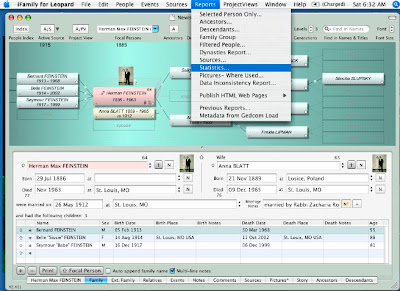
Here are some screenshots to go along with the instructions I gave Randy in his comments.
Step 1: From the 'Reports' drop-down menu, select 'Statistics'.
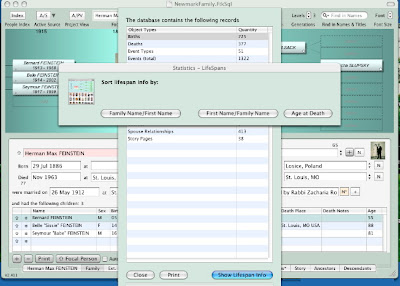
Step 2: A window will open with some general information on the number of births, deaths, marriage, pictures, sources, and a few other types of records. At the bottom of the window, click on 'Show Lifespan Info'. Another window will open providing you with a choice of three sorts: 1) Family name, First name; First name, Family name; Age at Death. I selected the last.
Step 3: the report won't fit on one screen, so you can scroll down to see more:
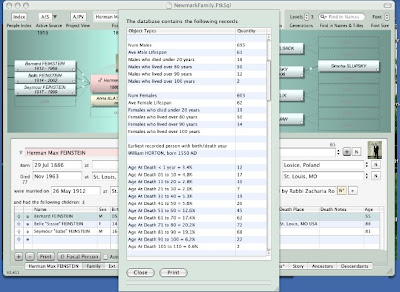 As you can see we start off with some overall statistics.
Num Males
Ave Male Lifespan
Males who died under 20 yrs (#)
Males who lived over 80 yrs (#)
Males who lived over 90 yrs (#)
Males who lived over 100 yrs (#)
Num Females
Ave Female Lifespan
Females who died under 20 yrs (#)
Females who lived over 80 yrs (#)
Females who lived over 90 yrs (#)
Females who lived over 100 yrs (#)
Earliest recorded person with birth/death year
Age At Death < year =" %"
Age At Death 1 to 10 = "%"
11 to 20 = "%"
21 to 30 = "%"
31 to 40 = "%"
41 to 50 =" %"
51 to 60 =" %"
61 to 70 =" %"
71 to 80 =" %"
81 to 90 =" %"
91 to 100 =" %"
101 to 110 =" %"
And if you scroll down more, you see the list of ages at death
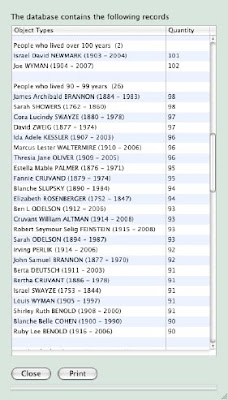 You could scroll down further and see the complete list of those who died from 80-89. You will notice that you have the option to either close the window, if you are happy just viewing it, or print it. It 'prints' to an .rtf file, and it opens in TextEdit.
[note: the family information in the images above will actually be discussed in an upcoming entry.]
I noted in the comments that iFamilyForLeopard could get them in a list by those who lived over 100, over 90, and over 80, but not descending order within the 10-year groupings. I'd actually noticed this a couple days earlier as I had been thinking about the topic for the upcoming Carnival of Genealogy, age. (I hope to finish writing that entry later today.) However, iFamilyForLeopard is continually being updated, and the developer releases a new version for download once or twice a month on average. These releases are actually several version numbers apart, whenever a significant number of upgrades have been made. You can special request the current release to be emailed to you. [All upgrades to the software are free.]
I suggested the modification to the report in their forums, and within 2.5 hours, the modification had been made. (As someone with programming experience, I had a suspicion my request was on the simpler side of some requests that get made in the forums, but I was still impressed.) I requested the new version, which was 2.411, so I was able to see it in action.
Here are some screenshots to go along with the instructions I gave Randy in his comments.
Step 1: From the 'Reports' drop-down menu, select 'Statistics'.

Step 2: A window will open with some general information on the number of births, deaths, marriage, pictures, sources, and a few other types of records. At the bottom of the window, click on 'Show Lifespan Info'. Another window will open providing you with a choice of three sorts: 1) Family name, First name; First name, Family name; Age at Death. I selected the last.

Step 3: the report won't fit on one screen, so you can scroll down to see more:
 As you can see we start off with some overall statistics.
Num Males
Ave Male Lifespan
Males who died under 20 yrs (#)
Males who lived over 80 yrs (#)
Males who lived over 90 yrs (#)
Males who lived over 100 yrs (#)
Num Females
Ave Female Lifespan
Females who died under 20 yrs (#)
Females who lived over 80 yrs (#)
Females who lived over 90 yrs (#)
Females who lived over 100 yrs (#)
Earliest recorded person with birth/death year
Age At Death < year =" %"
Age At Death 1 to 10 = "%"
11 to 20 = "%"
21 to 30 = "%"
31 to 40 = "%"
41 to 50 =" %"
51 to 60 =" %"
61 to 70 =" %"
71 to 80 =" %"
81 to 90 =" %"
91 to 100 =" %"
101 to 110 =" %"
And if you scroll down more, you see the list of ages at death
 You could scroll down further and see the complete list of those who died from 80-89. You will notice that you have the option to either close the window, if you are happy just viewing it, or print it. It 'prints' to an .rtf file, and it opens in TextEdit.
[note: the family information in the images above will actually be discussed in an upcoming entry.]
Thursday, April 3, 2008
So You Want a Wiki?
Here's the post I promised awhile back on the Technology themed Carnival of Genealogy.
You want a genealogy wiki. What are your options? As I see it, there are two basic options.
Option One: Find a public "Genealogy Wiki"
Is there a "One World Tree"-type website, but in wiki format? There is at least one: FamilyPedia, which is on Wikia. Wikia is a product of the same company that is responsible for WikiPedia. Basically anyone can create a Wiki about anything on Wikia, and someone's already created one for genealogy, so there's no real reason to recreate the wheel.
However - I see serious problems with using a public Wiki for family genealogy. I've seen some of the gross errors in Ancestry's "One World Tree", and I suspect there will be a lot of fighting ultimately between different users over ancestors, as one tells another that they have the wrong "John Smith" married to the wrong "Jane Green"
There is an "Alternate Surname" of "Newmack" on Ancestry for a local relative in a census. That means someone researching a relative with the "Newmack" surname found my family, and decided they were their family, and decided to be "helpful." On a Wiki I certainly could tell them "hey, sorry, you're wrong" and change it back. But what if they don't think they're wrong, and a fight ensues? Who's going to resolve these disputes to the satisfaction of both sides?
Option Two: install a wiki on a private website.
What do you need?
First, and foremost, you need a website where
1) you can install scripts written in languages such as PHP
2) you have access to MySQL databases
3) you can password protect your site
Wait! I don't understand those words!
PHP is a computer programming language. MySQL is a type of database. You don't have to know anything about either, as there are pre-written applications that you can install without knowing the languages themselves.
Every host that provides space for websites will have a list of features that they are able to provide. (Or at least every professionally run one will.) So you will only need to look through the list of features for the words "PHP" and "MySQL".
If you decided to skip #3 - password protection
you will likely find yourself coming back to it. You might not have a problem with anyone seeing the information on your website. However, wiki software allows anyone to modify the information. And while there aren’t going to be a lot of people interested in vandalizing your family history, there are computer-programs scouring the web looking for wiki pages to turn into spam. Think about the emails you receive. If it’s not password protected, you will have to spend some of your time fighting spam. If it is password protected, you will be spending zero time doing this. Password protection also allows you to put “family only” stuff on the site you might not otherwise.
Choosing a Host
To achieve #1 and #2 you are going to need to pay a host, but prices have come down from where they once were. There are a lot of hosts to choose from. I am only going to mention two that I have personal experience with, and feel I can recommend.
Hostrocket.com
$5/month (if you buy 2 years), $10/month if you buy 1 year
1000 GB of storage space
Unlimited bandwidth
Maximum 10 websites per account (maximum increased 1 website per month)
10 MySQL databases
PHP, MySQL, Perl
Lots of Extras
Dreamhost.com
$9/month if you buy 2 years, $10/month if you buy 1 year
500gb of storage space
5TB of monthly bandwidth (increases by 40gb each week)
Unlimited MySQL databases
Unlimited domains
Lots of extras
[Note: You may be familiar with one that has better prices. As I said, there are a lot of hosts competing against each other. I have had several years experience with both Hostrocket and Dreamhost, and have received good customer service from both of them. They have also both been in the business for awhile. Since 1999 for Hostrocket, and 1997 for Dreamhost. They're not likely to disappear tomorrow.]
While some of the figures look different for these two, for 90% of all people, they are the same. You probably know how many gb of space your computer holds. 1000 may be double 500, but both are probably more than you’re going to need. I am currently using about 3 gb of space to host six websites, including two family-wikis, A research site for a 19th century French author, and a literary magazine.
5 TerraBytes of bandwidth isn’t unlimited, technically, but you aren’t likely going to get that much traffic on a family website – no matter how large your family is. Due to its educational nature, my research site actually gets a fair amount of visitors, and it uses about 500 mb of bandwidth a month. (0.5 gb or .0005 tb)
One thing you may notice is that it is possible to host more than one domain (www.yourname.com) on one account. It might be possible to find somebody (or multiple somebodies) to split the cost of the account. In that case, Hostrocket’s limit on MySQL databases and on domains might make a difference in favor of Dreamhost at some point.
The domain names themselves cost about $10/year at godaddy.com.
Many hosts will have something they call ‘one-click installs’ or something similar, where they have a list of programs that can be installed almost with the click of a button into your account. This list can vary. Both Hostrocket and Dreamhost do have wiki-software in their one-click install list. However, there’s a difference.
Hostrocket lets you choose between PhpWiki and Tiki-Wiki. Both of these work well, but they have a different look-and-feel from the software that is used to run Wikipedia, which more people are familiar with. If you are actually familiar with editing pages on Wikipedia, you will probably want to install the software it uses. There’s nothing stopping you from installing it on HostRocket, but you’re going to have to install it manually (or get HostRocket support to install it for you.)
Dreamhost has MediaWiki (and PhpGEDView - a popular genealogy app) on their one-click installs.
So if the website is going to have a Wiki as one of its requirements, Dreamhost is slightly favorable between these two options, and it is where both of my family wikis are currently hosted. I have never attempted to install MediaWiki manually, so I am unable to give any advice on that, though the instructions are online.
Let me know in the comments if there are other aspects about maintaining a Family Wiki that you are interested in.
You want a genealogy wiki. What are your options? As I see it, there are two basic options.
Option One: Find a public "Genealogy Wiki"
Is there a "One World Tree"-type website, but in wiki format? There is at least one: FamilyPedia, which is on Wikia. Wikia is a product of the same company that is responsible for WikiPedia. Basically anyone can create a Wiki about anything on Wikia, and someone's already created one for genealogy, so there's no real reason to recreate the wheel.
However - I see serious problems with using a public Wiki for family genealogy. I've seen some of the gross errors in Ancestry's "One World Tree", and I suspect there will be a lot of fighting ultimately between different users over ancestors, as one tells another that they have the wrong "John Smith" married to the wrong "Jane Green"
There is an "Alternate Surname" of "Newmack" on Ancestry for a local relative in a census. That means someone researching a relative with the "Newmack" surname found my family, and decided they were their family, and decided to be "helpful." On a Wiki I certainly could tell them "hey, sorry, you're wrong" and change it back. But what if they don't think they're wrong, and a fight ensues? Who's going to resolve these disputes to the satisfaction of both sides?
Option Two: install a wiki on a private website.
What do you need?
First, and foremost, you need a website where
1) you can install scripts written in languages such as PHP
2) you have access to MySQL databases
3) you can password protect your site
Wait! I don't understand those words!
PHP is a computer programming language. MySQL is a type of database. You don't have to know anything about either, as there are pre-written applications that you can install without knowing the languages themselves.
Every host that provides space for websites will have a list of features that they are able to provide. (Or at least every professionally run one will.) So you will only need to look through the list of features for the words "PHP" and "MySQL".
If you decided to skip #3 - password protection
you will likely find yourself coming back to it. You might not have a problem with anyone seeing the information on your website. However, wiki software allows anyone to modify the information. And while there aren’t going to be a lot of people interested in vandalizing your family history, there are computer-programs scouring the web looking for wiki pages to turn into spam. Think about the emails you receive. If it’s not password protected, you will have to spend some of your time fighting spam. If it is password protected, you will be spending zero time doing this. Password protection also allows you to put “family only” stuff on the site you might not otherwise.
Choosing a Host
To achieve #1 and #2 you are going to need to pay a host, but prices have come down from where they once were. There are a lot of hosts to choose from. I am only going to mention two that I have personal experience with, and feel I can recommend.
Hostrocket.com
$5/month (if you buy 2 years), $10/month if you buy 1 year
1000 GB of storage space
Unlimited bandwidth
Maximum 10 websites per account (maximum increased 1 website per month)
10 MySQL databases
PHP, MySQL, Perl
Lots of Extras
Dreamhost.com
$9/month if you buy 2 years, $10/month if you buy 1 year
500gb of storage space
5TB of monthly bandwidth (increases by 40gb each week)
Unlimited MySQL databases
Unlimited domains
Lots of extras
[Note: You may be familiar with one that has better prices. As I said, there are a lot of hosts competing against each other. I have had several years experience with both Hostrocket and Dreamhost, and have received good customer service from both of them. They have also both been in the business for awhile. Since 1999 for Hostrocket, and 1997 for Dreamhost. They're not likely to disappear tomorrow.]
While some of the figures look different for these two, for 90% of all people, they are the same. You probably know how many gb of space your computer holds. 1000 may be double 500, but both are probably more than you’re going to need. I am currently using about 3 gb of space to host six websites, including two family-wikis, A research site for a 19th century French author, and a literary magazine.
5 TerraBytes of bandwidth isn’t unlimited, technically, but you aren’t likely going to get that much traffic on a family website – no matter how large your family is. Due to its educational nature, my research site actually gets a fair amount of visitors, and it uses about 500 mb of bandwidth a month. (0.5 gb or .0005 tb)
One thing you may notice is that it is possible to host more than one domain (www.yourname.com) on one account. It might be possible to find somebody (or multiple somebodies) to split the cost of the account. In that case, Hostrocket’s limit on MySQL databases and on domains might make a difference in favor of Dreamhost at some point.
The domain names themselves cost about $10/year at godaddy.com.
Many hosts will have something they call ‘one-click installs’ or something similar, where they have a list of programs that can be installed almost with the click of a button into your account. This list can vary. Both Hostrocket and Dreamhost do have wiki-software in their one-click install list. However, there’s a difference.
Hostrocket lets you choose between PhpWiki and Tiki-Wiki. Both of these work well, but they have a different look-and-feel from the software that is used to run Wikipedia, which more people are familiar with. If you are actually familiar with editing pages on Wikipedia, you will probably want to install the software it uses. There’s nothing stopping you from installing it on HostRocket, but you’re going to have to install it manually (or get HostRocket support to install it for you.)
Dreamhost has MediaWiki (and PhpGEDView - a popular genealogy app) on their one-click installs.
So if the website is going to have a Wiki as one of its requirements, Dreamhost is slightly favorable between these two options, and it is where both of my family wikis are currently hosted. I have never attempted to install MediaWiki manually, so I am unable to give any advice on that, though the instructions are online.
Let me know in the comments if there are other aspects about maintaining a Family Wiki that you are interested in.
Sunday, February 24, 2008
Technology
As a long time fan of SF/Fantasy novels and movies, I have learned from experience that genre movies don't win Best Picture, Best Actor, or Best Director awards. Fans must settle for Best Special F/X, Best Makeup, or possibly Best Soundtrack. There are the exceptions (2001: A Space Odyssey; Lord of the Rings) but the exceptions are rare.
Tonight is The Academy's night, and so it somehow seems appropriate that the theme for the 43rd Carnival of Genealogy is on technology, since the last Carnival focused on our Best of Awards. (It also seems just like yesterday that the 42nd Carnival concluded, but February is a short month.)
What technology do you most rely on for your genealogy and family history research?
Select one piece of hardware (besides your computer)
This isn’t difficult. Besides my computer, the piece of hardware I currently use the most is a microfilm reader. There are a lot of records that haven’t been scanned in, haven’t been indexed. They know me by now when I enter the Special Collections department.
One web site/blog (besides your own) that is indispensable to you.
Ancestry.
If I had to recommend one database subscription site to someone, this would be it. Others have been useful, but it’s hard for me to imagine where I would be without Ancestry – from what I have learned through their databases and forums.
One piece of software (besides your internet browser)
This is where I am most likely to deviate from a lot of answers.
MediaWiki.
I have set up two family wikis – both password protected – one for my mother’s family, and another for my father’s.
Here’s a view of the the homepage of my mother’s, as well as one entry on the site.


The images should look familiar to anyone who has experience with Wikipedia or any of its cousins. It uses the exact same software. The original theory behind installing the software was to facilitate other family members helping me in recording the information.
Theory and practice aren’t always the same. I think only one edit has been made so far by anyone except me. However, even when a cousin sends me an email with text for me to put onto a page, that’s helpful. And it’s easier for me to update a wiki than it is to update other types of family websites.
I've uploaded images of almost every document I have found. Most of the more recent entries have several photographs on them.
One might argue this hasn’t helped my ‘research’. However, I think one genealogy-obsessed cousin was impressed enough by it, and pleased with the password-protection, to send me her entire register. (And I have respected her wishes and not blogged any information for which I am indebted to her.)
I’ve been meaning to do a series of posts on my knowledge of and ideas for websites, including a few more snapshots of our wikis. Hopefully I will get a round tuit soon.
Tonight is The Academy's night, and so it somehow seems appropriate that the theme for the 43rd Carnival of Genealogy is on technology, since the last Carnival focused on our Best of Awards. (It also seems just like yesterday that the 42nd Carnival concluded, but February is a short month.)
What technology do you most rely on for your genealogy and family history research?
Select one piece of hardware (besides your computer)
This isn’t difficult. Besides my computer, the piece of hardware I currently use the most is a microfilm reader. There are a lot of records that haven’t been scanned in, haven’t been indexed. They know me by now when I enter the Special Collections department.
One web site/blog (besides your own) that is indispensable to you.
Ancestry.
If I had to recommend one database subscription site to someone, this would be it. Others have been useful, but it’s hard for me to imagine where I would be without Ancestry – from what I have learned through their databases and forums.
One piece of software (besides your internet browser)
This is where I am most likely to deviate from a lot of answers.
MediaWiki.
I have set up two family wikis – both password protected – one for my mother’s family, and another for my father’s.
Here’s a view of the the homepage of my mother’s, as well as one entry on the site.


The images should look familiar to anyone who has experience with Wikipedia or any of its cousins. It uses the exact same software. The original theory behind installing the software was to facilitate other family members helping me in recording the information.
Theory and practice aren’t always the same. I think only one edit has been made so far by anyone except me. However, even when a cousin sends me an email with text for me to put onto a page, that’s helpful. And it’s easier for me to update a wiki than it is to update other types of family websites.
I've uploaded images of almost every document I have found. Most of the more recent entries have several photographs on them.
One might argue this hasn’t helped my ‘research’. However, I think one genealogy-obsessed cousin was impressed enough by it, and pleased with the password-protection, to send me her entire register. (And I have respected her wishes and not blogged any information for which I am indebted to her.)
I’ve been meaning to do a series of posts on my knowledge of and ideas for websites, including a few more snapshots of our wikis. Hopefully I will get a round tuit soon.
Thursday, February 7, 2008
What does this mean?
I decided to run the MyHeritage software through a few more tests using a family photo of the Deutsch family. My great-grandparents and their seven children. (taken at some point in the 1920s.) The photo is perfect since most of them are directly facing the camera, which helps the face recognition software.

I'm unable to distinguish at the moment between two of the brothers since they're close enough in age and I don't have other photos to compare with. However, the oldest daughter is Jean, the youngest daughter is Berta, the oldest son is Ted, the youngest son is Allen, and I recognize my grandfather. That's five more tests I can run.
(Was the youngest son, "Allen", who was born in the US, named after "Armin", a child who died tragically in Romania, and I blogged about in October? First and last initials. I don't know for sure, but my suspicion is yes.)
Ted Ed looks 15% more like his mother. [This is what happens when one judges age by appearances. You'll note it was the fifth one I did -- I decided at the last moment that he was definitely older than the other two. I've been told I was wrong. I can't change it on the graphic below, but this note should suffice. I should have gotten identification from this source for this photo when I scanned it, but I'm glad she's reading my blog.]

And for the sons, it keeps getting worse for Samuel...
Martin looks 35% more like his mother

And if you think 35% is slightly worrisome, look at Allen's results:

I happen to agree with the results. I could almost get Allen and Helen confused. Luckily for Samuel, his daughters are a little more balanced.
Berta

Jean

My great-grandmother's genes appear to have had a tendency towards dominance.

I'm unable to distinguish at the moment between two of the brothers since they're close enough in age and I don't have other photos to compare with. However, the oldest daughter is Jean, the youngest daughter is Berta, the oldest son is Ted, the youngest son is Allen, and I recognize my grandfather. That's five more tests I can run.
(Was the youngest son, "Allen", who was born in the US, named after "Armin", a child who died tragically in Romania, and I blogged about in October? First and last initials. I don't know for sure, but my suspicion is yes.)
And for the sons, it keeps getting worse for Samuel...
Martin looks 35% more like his mother
And if you think 35% is slightly worrisome, look at Allen's results:
I happen to agree with the results. I could almost get Allen and Helen confused. Luckily for Samuel, his daughters are a little more balanced.
Berta
Jean
My great-grandmother's genes appear to have had a tendency towards dominance.
Wednesday, January 30, 2008
Email Backup
About a week ago, Charter Communications accidentally deleted several thousand customer email accounts - content irretreviable. Sally Jacobs of The Practical Archivist posted a reminder to back-up your emails.
Back in 2004, when Google's Gmail was still in its 'invite' stage, I managed to snag what was then a rare invite. I fell in love with it. Being able to access my email from anywhere is extremely useful, and Gmail was a lot more user friendly than other webmails I had tried in the past. Soon I had all my email addresses (I have a few) forwarded to my Gmail account, and I haven't stored emails on my home computer since.
While almost everyone backs up their photographs, and other important documents, how many people actually make a backup to Data CD, Data DVD, or an external hard drive of their email? What happens when your computer crashes? (Not if. Computers are expensive, and lots of people use a computer until the day it irrevocably crashes.) You may feel less safe since you're not in control, but I still feel email saved on an external server is safer than on a home computer.
Pop3
That will save a copy of all incoming mail on Google's servers. To save a copy of outgoing mail, if you send it via gmail and not from your home computer's application, you'd have to cc or blind cc yourself so that you receive it as incoming mail.
Setting up IMap makes your home computer's email and your Gmail account appear to be synched mirrors of each other. When you do something at one, it happens at the other. Move a message to a folder, receive a message, doesn't matter. Works with other email devices too.
I set it up with my Apple Mail program, and here's what the window looks like:

If you have labels in your Gmail account, they will appear as separate folders. If an email message has multiple labels, it will appear in multiple folders.
I tried to do this. In Apple Mail I went to the "All Mail" and deleted a message. It looked like it disappeared. I went to a different folder, returned to "All Mail" and the accounts resynched and the email appeared again. I had to move the mail I wanted to delete to the "Bin" folder for it to stay. Logging into my Gmail account the deleted msg is in the trash bin. Another message I had just clicked "delete" while in "All Mail", is still in the inbox, but has the label "deleted message" indicating that I had tried to do so. Once in the bin (on Apple Mail, or WebGmail) clicking 'delete' permanently deletes. But there are enough steps here that it isn't going to happen accidentally.
What would happen with a personal computer crash/Google crash?
This is why I used the phrase 'appear to be synched mirrors of each other' above. What's really happening is that the mail is being stored on Google's servers, and your home computer is accessing that. With constant DSL/Cable connections this works. But its not on your computer -- unless you manually move emails you want to save to your hard drive to a non-Imapped folder. Which is what the "Saved Messages" folder is for in the image above.
If you know you want a copy of every email on your home computer, you probably will want to use Pop3. (Including every spam, every joke Cousin Fred sends, etc etc). Imap makes it easy though to move individual emails you want to save to your home folders.
You can combine the two. Receive all email at home through Pop3 on your Mail application. Make sure a copy is stored in your Gmail account. If the account is also IMapped, you can view all the messages in your online sent folder. If you aren't ccing yourself when you send messages from gmail, they won't be on your computer, but that limits the number of messages you need to manually move to a saved folder.
Hopefully this isn't too confusing. Everything in this post has assumed you are using Gmail and Apple Mail. However, Gmail help menus have instructions for setting up Pop3 and IMap for several email applications, and it should probably work similarly. If you are using Hotmail, Yahoo, or another web-based email service they probably have help menus as well.
My rationalization was that my email is actually safer on Google's servers than my own. Despite whether or not what happened at Charter could happen at Google I still believe this to be the case. (There may be more backup protocols at Google now than there were at Charter, as this did happen at Google a year ago on a much smaller scale - 60 accounts were lost. But for those 60 people, it was just as much of a loss as it was for the 14,000 Charter customers.) Computer crashes on personal home computers happen more often than major email providers accidentally delete accounts.
While almost everyone backs up their photographs, and other important documents, how many people actually make a backup to Data CD, Data DVD, or an external hard drive of their email? What happens when your computer crashes? (Not if. Computers are expensive, and lots of people use a computer until the day it irrevocably crashes.) You may feel less safe since you're not in control, but I still feel email saved on an external server is safer than on a home computer.
But...better yet...would be having it stored *both* places. At home and on a webserver somewhere. Can this be accomplished easily? Yes. Why am I not doing it? Sally's post has led me to question that, and it may change soon. How is it done? There are two rather easy methods available at Gmail, and at least one of them is usually available on other webmail systems. Pop3 and IMAP. (Pop3 being the more common.)
Pop3
Those who are downloading their email to their computer are already familiar with Pop3. It's how you set up your Outlook, Netscape, Apple Mail, Eudora, or whatever email client you use. In Gmail's settings you can set it up so that you download your email like you have been. But you can check a box that says 'keep a copy on Gmail.' (see below - click to enlarge)


That will save a copy of all incoming mail on Google's servers. To save a copy of outgoing mail, if you send it via gmail and not from your home computer's application, you'd have to cc or blind cc yourself so that you receive it as incoming mail.
Everything you are doing now by receiving mail at home on your home computer wouldn't change. You'd just have a stored copy on the web you could access at any time.
IMap
Setting up IMap makes your home computer's email and your Gmail account appear to be synched mirrors of each other. When you do something at one, it happens at the other. Move a message to a folder, receive a message, doesn't matter. Works with other email devices too.
I set it up with my Apple Mail program, and here's what the window looks like:

If you have labels in your Gmail account, they will appear as separate folders. If an email message has multiple labels, it will appear in multiple folders.
So what about deleting messages? What happens if you delete a message at home accidentally?
I tried to do this. In Apple Mail I went to the "All Mail" and deleted a message. It looked like it disappeared. I went to a different folder, returned to "All Mail" and the accounts resynched and the email appeared again. I had to move the mail I wanted to delete to the "Bin" folder for it to stay. Logging into my Gmail account the deleted msg is in the trash bin. Another message I had just clicked "delete" while in "All Mail", is still in the inbox, but has the label "deleted message" indicating that I had tried to do so. Once in the bin (on Apple Mail, or WebGmail) clicking 'delete' permanently deletes. But there are enough steps here that it isn't going to happen accidentally.
What would happen with a personal computer crash/Google crash?
This is why I used the phrase 'appear to be synched mirrors of each other' above. What's really happening is that the mail is being stored on Google's servers, and your home computer is accessing that. With constant DSL/Cable connections this works. But its not on your computer -- unless you manually move emails you want to save to your hard drive to a non-Imapped folder. Which is what the "Saved Messages" folder is for in the image above.
If you know you want a copy of every email on your home computer, you probably will want to use Pop3. (Including every spam, every joke Cousin Fred sends, etc etc). Imap makes it easy though to move individual emails you want to save to your home folders.
You can combine the two. Receive all email at home through Pop3 on your Mail application. Make sure a copy is stored in your Gmail account. If the account is also IMapped, you can view all the messages in your online sent folder. If you aren't ccing yourself when you send messages from gmail, they won't be on your computer, but that limits the number of messages you need to manually move to a saved folder.
Hopefully this isn't too confusing. Everything in this post has assumed you are using Gmail and Apple Mail. However, Gmail help menus have instructions for setting up Pop3 and IMap for several email applications, and it should probably work similarly. If you are using Hotmail, Yahoo, or another web-based email service they probably have help menus as well.
Monday, December 17, 2007
This post is for the dogs
On a recent trip with some friends to Springfield, Missouri, we were walking out of the Lincoln home, and the tour-guide was mentioning the Lincoln pets, and I said “The dog’s name was Fido.”
The tour-guide confirmed the information.
A friend looked at me, “how the heck did you know that?”
“It says so in the foyer of the museum we were in twenty minutes ago.”
“There you go, reading again.”
Here’s a brief biography of Fido Lincoln, with three photographs.

also mentioned that he hadn’t gone to DC with the Lincolns, the newly elected President not certain the beloved dog would survive the trip. Fido was left with neighbor boys, John and Frank Roll, with explicit instructions that he be pampered in the style to which he had been accustomed. However, the museum's blurb didn't mention that Fido Lincoln Roll’s death mirrored that of his former master.
For those who like to play the game of comparison between Lincoln and Kennedy, one might also add to the list that in 1966, one century after Fido was stabbed to death, President Lyndon Baines Johnson's dog, Him, was run over by a car. (Linked news story is actually about the death of Buddy, Clinton's dog, but it mentions LBJ's dog.)
A month ago I was looking at some photos in my late grandfather’s collection, and noticed a photograph of my great-grandmother holding a pup. I was told by my mother the dog’s name was Choo-Choo.

I came to the conclusion that Choo-choo, and all the other pets of importance to family members, deserved mention in my genealogy database. Perhaps entire entries. But how do I do that? I’m not so far over the edge that I would indicate a pet as a person’s child. “Adopted” doesn’t quite work either. (Close, but I wouldn't want anyone to get confused...)
So I went to the IFamilyForTiger forums and made the suggestion.
Keith Wilson, the developer behind the software, gave me a few ideas for recording pets as the software currently stood, and also said there was a potential for an AssociatedPerson entity in the future. While meant for friends, business associates, etc, it could certainly be expandable to our animal companions. I look forward to that extension, for recording animal companions, but also because I can think of a few friends and associates for whom I would write entries. However, I know other features may be ahead of it on his list. I also know he is busy working on IFamilyForLeopard which I expect to be updating to when it is released.
The tour-guide confirmed the information.
A friend looked at me, “how the heck did you know that?”
“It says so in the foyer of the museum we were in twenty minutes ago.”
“There you go, reading again.”
Here’s a brief biography of Fido Lincoln, with three photographs.
Around 1855 Abraham Lincoln's beloved Fido was born. He was a mutt so to speak but as far as the Lincolns were concerned, Fido was royalty. He was often seen with his master around Springfield carrying a newspaper in his mouth. He was a brownish dog with more or less yellow in his coat, resembling perhaps a shepherd.I like that under the heading it says, “uncertain ancestry.” That’s what the world needs – professional dog genealogists. However, I was shocked to learn of Fido’s end. The blurb at the museum, which included this portrait

also mentioned that he hadn’t gone to DC with the Lincolns, the newly elected President not certain the beloved dog would survive the trip. Fido was left with neighbor boys, John and Frank Roll, with explicit instructions that he be pampered in the style to which he had been accustomed. However, the museum's blurb didn't mention that Fido Lincoln Roll’s death mirrored that of his former master.
One year later, Fido was also "assassinated" or killed by a man, who, in a drunken rage, stabbed the dog to death. Fido had playfully put his paws up on the man who was sitting on the street curb. Fido had strayed from his home with the Rolls, and like his master, was assassinated.Extremely sad, but Fido did live ten years, in a manner most 19th century canines could only dream about.
For those who like to play the game of comparison between Lincoln and Kennedy, one might also add to the list that in 1966, one century after Fido was stabbed to death, President Lyndon Baines Johnson's dog, Him, was run over by a car. (Linked news story is actually about the death of Buddy, Clinton's dog, but it mentions LBJ's dog.)
A month ago I was looking at some photos in my late grandfather’s collection, and noticed a photograph of my great-grandmother holding a pup. I was told by my mother the dog’s name was Choo-Choo.

I came to the conclusion that Choo-choo, and all the other pets of importance to family members, deserved mention in my genealogy database. Perhaps entire entries. But how do I do that? I’m not so far over the edge that I would indicate a pet as a person’s child. “Adopted” doesn’t quite work either. (Close, but I wouldn't want anyone to get confused...)
So I went to the IFamilyForTiger forums and made the suggestion.
Keith Wilson, the developer behind the software, gave me a few ideas for recording pets as the software currently stood, and also said there was a potential for an AssociatedPerson entity in the future. While meant for friends, business associates, etc, it could certainly be expandable to our animal companions. I look forward to that extension, for recording animal companions, but also because I can think of a few friends and associates for whom I would write entries. However, I know other features may be ahead of it on his list. I also know he is busy working on IFamilyForLeopard which I expect to be updating to when it is released.
Saturday, November 17, 2007
Can you top this?
There's a meme going around, and I've been tagged (twice), but the last book I read was less than 161 pages, and the book I'm writing for National Novel Writing Month isn't quite there yet. Hopefully before the month ends.
So I thought I would start a meme of my own - this one related to genealogy. No tagging...whether to help spread the meme it is up to you.
Here's a picture (from my genealogy software program) illustrating quite well, I believe, one rather productive ancestor. He needed three wives, but not at the same time.

Can you top this? (The number to top is 22)
Bonus points for a snapshot of your genealogy software illustrating the feat.
(Sidenote: The one in the middle is my great-grandfather. He was born 7 months after his father came home from the Civil War. I'm not quite sure what to do with that bit of information. My great-grandfather has no surviving male descendants - direct male line, that is. I'm certainly alive.)
Update
Since the question has been raised on how many children per-wife, and since the navigation window of IFamilyForTiger makes it so easy to change the focus, and get a new snapshot...Here are the snapshots for Cordelia, Abigail and Margaret Jane. (click to enlarge)
So I thought I would start a meme of my own - this one related to genealogy. No tagging...whether to help spread the meme it is up to you.
Here's a picture (from my genealogy software program) illustrating quite well, I believe, one rather productive ancestor. He needed three wives, but not at the same time.

Can you top this? (The number to top is 22)
Bonus points for a snapshot of your genealogy software illustrating the feat.
(Sidenote: The one in the middle is my great-grandfather. He was born 7 months after his father came home from the Civil War. I'm not quite sure what to do with that bit of information. My great-grandfather has no surviving male descendants - direct male line, that is. I'm certainly alive.)
Update
Since the question has been raised on how many children per-wife, and since the navigation window of IFamilyForTiger makes it so easy to change the focus, and get a new snapshot...Here are the snapshots for Cordelia, Abigail and Margaret Jane. (click to enlarge)
 |  |  |
Thursday, November 15, 2007
Ancestry and FamilyTreeMaker
My Ancestry.com account expired at the beginning of the month, and I am already suffering withdrawal symptoms. One is able to search through the databases for free, and if you don't have "exact match" checked, they will provide names and locations. But, you can't view the image, or see some specifics like dates. And waiting until I get to the library isn't working well because I don't have a regular library routine.
Randy posted about the amazing deal he got through NothingButSoftware when he purchased FamilyTreeMaker.
I'm somewhat embarrassed to admit I remember reading Randy's post back in October. The deal now isn't quite as good as it was then...but it's still good.
I ignored it a month ago --this is going to sound funny-- because I own a Mac. FamilyTreeMaker is PC only.
But let's see...Current Annual Ancestry Subscription: $155
NothingButSoftware Deal: FTM 16, a year of Ancestry, plus more software and books: $60. I can decrease that to 9 months of Ancestry, and pay only $30.
I could buy the package, sign up for Ancestry, and sell someone FTM16 (Or just give it to a friend. I'd still come out ahead.) It's possible Ancestry could balk at me extending my subscription over the phone as opposed to through the software. Randy was successful, but I wouldn't be calling the day my account expired.
I will be receiving a laptop with a Linux OS within about a month. I know Windows can usually be installed on Linux...though I don't really want to do that. And since this isn't the most powerful computer, I'm not sure how well Windows will run on it, or even if it will. (it's the XO laptop being shipped to children in developing nations. For two weeks you can give one and get one.)
I suspect I will have an Ancestry subscription again in the not-too-distant future.
Randy posted about the amazing deal he got through NothingButSoftware when he purchased FamilyTreeMaker.
I'm somewhat embarrassed to admit I remember reading Randy's post back in October. The deal now isn't quite as good as it was then...but it's still good.
I ignored it a month ago --this is going to sound funny-- because I own a Mac. FamilyTreeMaker is PC only.
But let's see...Current Annual Ancestry Subscription: $155
NothingButSoftware Deal: FTM 16, a year of Ancestry, plus more software and books: $60. I can decrease that to 9 months of Ancestry, and pay only $30.
I could buy the package, sign up for Ancestry, and sell someone FTM16 (Or just give it to a friend. I'd still come out ahead.) It's possible Ancestry could balk at me extending my subscription over the phone as opposed to through the software. Randy was successful, but I wouldn't be calling the day my account expired.
I will be receiving a laptop with a Linux OS within about a month. I know Windows can usually be installed on Linux...though I don't really want to do that. And since this isn't the most powerful computer, I'm not sure how well Windows will run on it, or even if it will. (it's the XO laptop being shipped to children in developing nations. For two weeks you can give one and get one.)
I suspect I will have an Ancestry subscription again in the not-too-distant future.
Tuesday, October 16, 2007
Mac Genealogy Software Demo and Upgrade Comparison
Many people like to test software before they buy – which is why software companies create Demo programs. Limitations of some sort are always placed on Demo packages (otherwise, people would never buy the full software.) Below is a comparison of the Demos offered by three major genealogy software programs for the Mac. I’m not suggesting one should buy the full program based completely on the demo, but the three are significantly different in my opinion making the differences worth mentioning.
MacFamilyTree [website]
Their demo is fully functional, except you can’t save any entries. At least that is what the website says. I bought the software from a store without testing the demo. Taking the website at its word, this is an interesting limitation. I could import a gedcom created in another software program, and give it a full test. However, if it were the first demo I tried, I would be frustrated, because I’d have to enter enough data to test it…and do it in one sitting, because I couldn’t save anything. I assume there is no time limitation on the demo – not really necessary with the ‘no save’ feature in my mind.
Reunion [website]
Also seems to be a non-expiring demo. However, you can’t import or export GED files. You can’t save charts. And printouts have a watermark on them. You are also limited to 50 entries.
Not being able to import a GED file, makes it more difficult to test. They do provide a sample "Family File" (The Kennedy family). It contains 35 entries, but with few entries that are 'outside the norm' to adequately test the software, so you will likely end up entering data to do so.
IFamilyForTiger [website]
Almost fully functional 10-day demo. You’ve only got ten days to test it, the version might be an older version than the most current, and you're unable to export a GED file. Otherwise fully functional. (The website says that you also can't use the menu option to upgrade the demo to a newer version. I'd think that was common sense, but they probably have to say it.)
It comes with a sample database – the British Royal Family – with over 3000 entries which provides ample records to test all of the features. You can also import any Gedcom you already have, with no limitation on size.
Upgrade Policy Comparison
This is a much shorter comparison – and something someone might later wish they considered prior to making their initial purchase.
Reunion
Original software: $100
Upgrades: $60 (based on current price for Reunion 9 Full vs Upgrade)
MacFamilyTree
Original software: $50
Upgrades: $25 (based on current price for MacFamilyTree 4.5 Full vs Upgrade)
IFamilyForTiger
Original software: $30
Upgrades: Free
(note: I round all prices to the nearest dollar.)
MacFamilyTree [website]
Their demo is fully functional, except you can’t save any entries. At least that is what the website says. I bought the software from a store without testing the demo. Taking the website at its word, this is an interesting limitation. I could import a gedcom created in another software program, and give it a full test. However, if it were the first demo I tried, I would be frustrated, because I’d have to enter enough data to test it…and do it in one sitting, because I couldn’t save anything. I assume there is no time limitation on the demo – not really necessary with the ‘no save’ feature in my mind.
Reunion [website]
Also seems to be a non-expiring demo. However, you can’t import or export GED files. You can’t save charts. And printouts have a watermark on them. You are also limited to 50 entries.
Not being able to import a GED file, makes it more difficult to test. They do provide a sample "Family File" (The Kennedy family). It contains 35 entries, but with few entries that are 'outside the norm' to adequately test the software, so you will likely end up entering data to do so.
IFamilyForTiger [website]
Almost fully functional 10-day demo. You’ve only got ten days to test it, the version might be an older version than the most current, and you're unable to export a GED file. Otherwise fully functional. (The website says that you also can't use the menu option to upgrade the demo to a newer version. I'd think that was common sense, but they probably have to say it.)
It comes with a sample database – the British Royal Family – with over 3000 entries which provides ample records to test all of the features. You can also import any Gedcom you already have, with no limitation on size.
Upgrade Policy Comparison
This is a much shorter comparison – and something someone might later wish they considered prior to making their initial purchase.
Reunion
Original software: $100
Upgrades: $60 (based on current price for Reunion 9 Full vs Upgrade)
MacFamilyTree
Original software: $50
Upgrades: $25 (based on current price for MacFamilyTree 4.5 Full vs Upgrade)
IFamilyForTiger
Original software: $30
Upgrades: Free
(note: I round all prices to the nearest dollar.)
Sunday, September 16, 2007
Personal Ancestry Writer II
I found a free Mac download that will export a Register-format report from a Gedcom file. It's caled Personal Ancestry Writer II.
From the official description:
From the official description:
It combines most of the features of the LDS Personal Ancestral File program (PAF) for the Macintosh (for which all development stopped a few years ago after release 2.3.1), with additional features that generate web pages (in HTML), word processing files (in RTF for, e.g., AppleWorks) and desktop publishing files (in MML for FrameMaker). The generated report files include genealogical dictionaries, registers, ahnentafels and lineages—such as appear on this site—as well as some interesting text files and pedigree charts.It tries to do a lot of things, and could be used possibly as one's primary software, though its interface looks like it was created in the dark ages of System 7 and never updated. Still, it is free.
PAWriter is not meant to have the bells and whistles that are in the current crop of genealogical programs. The emphasis is on maintaining a genealogical database from which the user can write books and/or post web pages about a family.Users of MacFamilyTree or iFamily who feel they must have a Register report can use it easily for that purpose.
Subscribe to:
Posts (Atom)


 Posts
Posts